Where a logo minimum size actually comes from
Shrink a lockup and every part gets smaller at the same rate, but the parts don’t fail at the same rate. A bold name can stay readable long after the tagline under it has turned into a smudge, so the minimum belongs to the first element to fail, not to the logo as a whole.
In most logos that element is one of these:
- The descriptor or tagline. Small, light and widely letterspaced; in a two-line lockup it’s nearly always the limit.
- Stroke weight. Hairline serifs, thin outlines and fine contour lines drop below what a screen pixel or an ink dot can hold.
- Counters and gaps. The enclosed spaces in letters like e and a close up, through ink spread on paper and antialiasing on screen.
- Fine detail. Soft gradients, inner lines in an icon, a tiny trademark symbol.
A worked illustration, with our numbers rather than any standard. Say a physiotherapy clinic’s logo has PHYSIOTHERAPY set beneath the name, and the descriptor’s capitals are one-fortieth of the lockup’s visible width. At 400px wide those capitals are 10px tall, which reads fine. At 160px they’re 4px tall, and nobody can draw a readable R in four pixels, even while the clinic name stays clear.
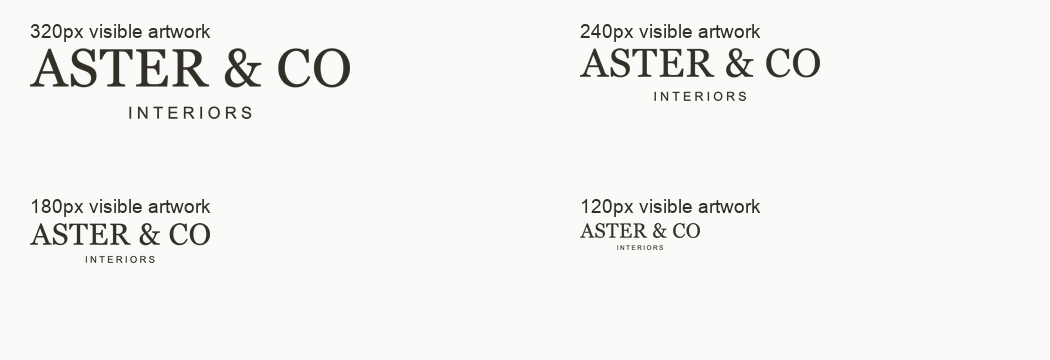
That sample report’s finding “The descriptor is the first element to lose legibility” describes the same pattern. At 180px and especially 120px, the thin, widely spaced INTERIORS letters are hard to read at normal viewing size, while ASTER & CO is still identifiable. One lockup, two minimums.
Measure the visible artwork, not the file
Agree first on what’s being measured. A logo file is a rectangle, and the logo rarely fills it; exports with transparent backgrounds often carry wide margins of empty space. When a guideline says “minimum 200px wide” and a developer sets the image element to 200px, the letters themselves might be 120px wide.
The correction is simple division. Say the visible artwork fills 60% of the file’s width. A file placed at 200px then shows 120px of logo, and to get 200px of actual logo you’d have to place it at about 333px (200 ÷ 0.6). In practice nobody does the sum: people enlarge the image until it looks right, a colleague crops it differently elsewhere, and the logo ends up at three apparent sizes.
The sample audit measured exactly this. Its primary wordmark file is 1600px wide, but the visible ink spans only 894px, so a 320px-wide image element shows about 179px of actual wordmark. The report rates this Medium severity, P2, and asks for tightly framed usage exports, with visible-artwork width stated separately from file width.
So a logo minimum size always refers to the visible artwork, measured from the left edge of the ink to the right. Record the file’s dimensions separately, or better, supply exports framed tightly enough that nobody has to divide.
Minimum logo size for web is a separate question from print
Screens and paper fail in different ways. Converting 30mm into some pixel figure gives you a threshold that’s right for neither.
On screen: CSS pixels and display density
Write screen minimums in CSS pixels, the unit a developer actually types into a stylesheet. A high-density phone draws each CSS pixel with two or more physical pixels, so edges look crisper, but the descriptor is just as small to the eye. A standard-density office monitor is harsher: a hairline that lands between two pixels gets antialiased into a gray smear. Check both.
A bigger export doesn’t rescue a logo that’s displayed too small. A 2x or 3x file keeps edges sharp on dense screens, but a logo shown 120px wide is still 120px wide. Resolution fixes blur, not size. The sample audit makes the same point about the studio’s icon:
The icon needs a dedicated very-small-size treatment
What we observed
The icon uses two fine nested arches joined by a horizontal base. Its structure is clear at 128px and 64px. At 32px the strokes are already delicate; at 24px and 16px the two contours depend strongly on antialiasing and become faint. The icon exists and is assessable; the problem is its small-size behavior.
Why it matters
A browser tab, compact app tile or dense interface may give the logo only a few pixels of stroke width. Merely exporting the same drawing at higher resolution does not change its appearance when displayed at the same CSS size.
Recommended response
Ask the designer to test an optically heavier small-use icon. Consider fewer contours or a simpler silhouette if stroke adjustment alone does not hold. Preserve the architectural idea and review the result beside the original.
In print: millimeters and the print process
Print minimums go in millimeters or inches and depend on how the piece is made. Offset printing on coated stock holds fine detail well. Uncoated paper absorbs more ink, so dots spread and counters close sooner. Newsprint, screen printing on fabric, embroidery and engraving are far less forgiving; some can’t hold a thin descriptor at any practical size. A useful print minimum names the process it was tested on.
This is where “minimum 30mm” can finally earn a reason. Suppose a printed proof shows the descriptor’s capitals need to be at least 1.5mm tall to read cleanly on stationery, and they’re one-twentieth of the lockup’s width. The minimum is 1.5 × 20 = 30mm. Same number, but now a printer can check it.
What logo variations do I need
Some places never have room for the full lockup. A browser tab may draw a favicon at 16 pixels. A round profile avatar trims the corners off a square image and leaves a wide wordmark tiny in the middle. Those places need a version drawn for the small space, not the big logo squeezed into it.
Work backward from where the logo has to appear, then assign a version to each place. Most small businesses end up with something close to this:
- Full lockup: name plus descriptor, for roomy headers, proposals and signage.
- Name without the descriptor: for compact headers and email signatures, where the surrounding page already says what the business does.
- Compact mark: an icon or monogram for avatars, app tiles and favicons. At the very smallest sizes it may need its own drawing with heavier strokes.
- Single-color and reversed versions: for one-color printing and dark backgrounds. A light logo baked onto a solid panel isn’t the same thing as a transparent reversed export.
That set is what people mean by a responsive logo: versions that swap as space shrinks, each with its own minimum. On a website a developer builds the swap, so describe it in their terms, such as “below 200px of available header width, use the name-only version”.
Don’t make the name-only version by deleting a line from the master file. The name usually needs rebalancing once the descriptor goes, and a designer should approve the result. Whether the logo itself is doing its job is a different question, covered in how to evaluate a logo design without arguing about taste.
Clear space is the other half of the rule
Minimum size says how small the logo can go; clear space says how close everything else can get. They fail together: a logo at its minimum with a button pressed against it looks smaller than it is.
Define clear space in a unit taken from the logo itself, such as the height of the name’s capitals or the width of the icon, so it scales with the logo. Measure it from the edge of the visible artwork. File padding is not clear space. It’s whatever the export happened to leave, and nobody decided it.
Cover avatar circles too: an icon sized to the edges of a square loses its corners when the platform crops it round. The sample audit’s finding “Avatar framing makes the icon feel smaller than necessary” shows the opposite trap: the padded source file fitted into a 96px circle leaves the visible icon about 52px wide.
Writing logo minimum size guidelines people can follow
The person reading this rule is a printer checking a proof or a developer setting a header width. Spell out five things:
- Which version it applies to: full lockup, name only or compact mark, identified by its export file name.
- What’s measured: visible artwork width, or height for stacked versions. Never the file’s dimensions.
- The unit for the medium: CSS pixels on screen, millimeters in print, with the print process named where it matters.
- What happens below the line: which version takes over, or that the logo shouldn’t be used there at all.
- How it was checked: the placement, screen or printed proof the number came from, so it can be rechecked when the logo changes.
It doesn’t claim 200px is universal; it records where the number came from. Rules like this also stop a logo drifting from channel to channel, one quiet cause of inconsistent branding.
See it at real sizes before you commit to a number
Every threshold should come from the logo where it will live: the real header at 100% zoom, the email signature, the avatar after the platform’s crop, a printed proof. Then ask someone who doesn’t know the logo to read the descriptor without zooming. If they hesitate, the number or the version is wrong.
A second pair of eyes helps, because the people who made a logo can read its descriptor at any size. Prooflin’s Logo Audit reviews legibility, scalability and variants from the exported files you supply. In Prooflin’s sample Logo Audit for a fictional interior design studio, the findings include the padded-file problem (Medium severity, P2), “The descriptor is the first element to lose legibility” and “The icon needs a dedicated very-small-size treatment”, each tied to a specific supplied file. Even its 240px starting point for the full lockup is labeled provisional. Prooflin accepts PNG, JPG/JPEG, WebP or PDF, so an SVG master needs exporting first. It doesn’t draw a compact version or set your thresholds; that’s still the designer’s call.
What to do this week
None of this needs a full guideline rewrite.
- Look at the logo’s smallest placements (mobile header, email signature, avatar) at 100% on a real device, and measure the visible artwork in each.
- Ask someone outside the business to read the descriptor.
- Wherever it fails, find more space or switch versions. If the right version doesn’t exist yet, that’s your designer’s brief.
- Rewrite the minimum in your guidelines with its unit, its version and how it was checked.
If you build websites, see how Prooflin fits web designers and developers. The Help Center covers preparing images and PDF pages for a design audit.