Why the owner reads the homepage wrong
You can’t read your own homepage cold. You know the business has six services and that “the studio” means the clinic on Elm Street. A first-time visitor knows neither, and won’t scroll to find out without a reason.
That gap is why homepage rewrites stall. Everyone inside reads the page with context the visitor lacks, so the meeting drifts into taste: the hero photo, the testimonial slider, which section to cut. None of it can be settled until you’ve agreed what the page must make clear.
A useful homepage review starts from the visitor’s side. Rather than asking whether the page is good, it asks what a stranger can answer after the first screen and the first scroll, and where the page leaves them guessing.
The five questions a homepage audit should answer
Stripped to its job, a homepage has to let a visitor settle five things quickly:
- What is this? The category of business, in words a customer would use.
- Is it for me? The audience and, for a local business, the area you serve.
- Can I trust it? Evidence that real people have used it and been looked after.
- What does it involve or cost? Enough about the process, price range or first step to remove the biggest unknown.
- What do I do now? One obvious next action, worded for what actually happens when they tap it.
You may know the five-second test: show someone a page briefly, then ask what they remember. Treat it as a principle rather than a ritual. A homepage gets about one glance to establish the first two answers, and everything below depends on them.
Take an illustrative business, Fernhill Physio, a three-clinician practice in a town called Fairview. It’s invented. Its problems aren’t.
What is this, and is it for me?
Fernhill’s hero says “Move better. Live better.” over a photo of someone jogging on a beach. The owner reads that as physical therapy, because she knows it is. A visitor could as easily read a gym or a supplement brand. The town name appears once, in the footer.
Insiders miss this because the brand name already means something to them. To everyone else, a headline that could belong to fifty businesses does no work. The fix is rarely clever: name the service and the place in the opening content, and let the slogan carry tone underneath.
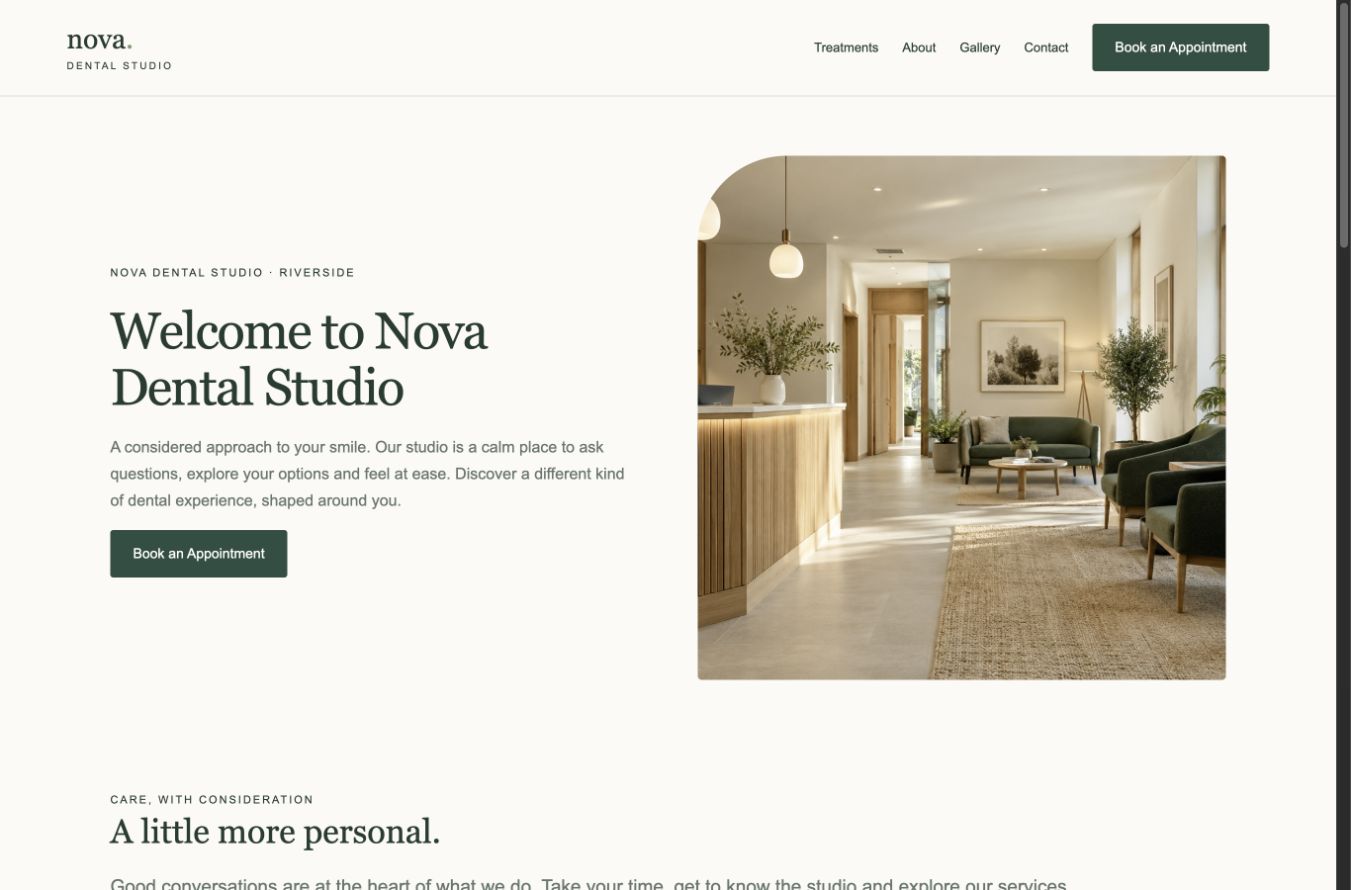
The sample audit Prooflin publishes for Nova Dental Studio, a made-up clinic, records the same pattern. Its finding shows what a homepage audit should hand back: what was observed, why it matters, and how you’d know it’s fixed.
The homepage introduction does not name the care on offer
Observed
The homepage H1 is “Welcome to Nova Dental Studio”. Its supporting paragraph describes a considered, calm experience but does not name a treatment. The first treatment names appear in the third main section, after the welcome and studio-positioning sections.
Why it matters
An arriving visitor can identify the brand and Riverside location, but has to continue reading to confirm whether the studio offers the care they need. This is a message-specificity gap. The calm visual identity is a strength worth keeping.
Completion check
At desktop and 390px, a reviewer should be able to identify the service category, location and next action from the opening content, without consulting a later section. Confirm every named service against the clinic’s approved list.
Note the observation’s last line. The care on offer isn’t missing; it’s three sections down, which is why the owner never sees the problem.
Can I trust it?
Most homepages have proof, just in the wrong place. Fernhill has twelve good reviews in a slider above the footer, its clinicians’ licenses on the About page, and no photo of the actual clinic. Someone comparing three practices sees a stock beach and a slogan at the moment they’re choosing.
Proof works hardest next to the decision it supports: a short review beside the booking button, the licensing line near the services, a real treatment-room photo where the beach now sits. Moving proof up is cheap. Inventing it is off the table.
What does it involve, and what do I do now?
Owners leave price and process off the homepage because “it depends”. It usually does. But a visitor with a sore knee mostly wants to know whether the first visit is an assessment, how long it takes and whether they need a referral. One sentence covers that, and removes a reason to call a competitor instead.
Then the action. Fernhill’s first screen offers “Book now”, “Call us”, “Get our free guide” and a newsletter box, all equally loud: the page hasn’t decided what it wants. Pick one primary action, keep one secondary route (usually the phone number) and move the rest down. Label the button for what happens. “Request an assessment” is more honest than “Book now” if reception answers the form the next morning.
The homepage above the fold, on desktop and on a phone
“Above the fold” survives as shorthand for what the visitor sees before deciding to scroll or leave. A homepage has at least two folds, though, and they rarely show the same thing.
On a wide screen the headline, supporting line, photo and button often fit together. On a 390px phone the photo stacks with the text, the header shrinks to a menu icon, and the button can slide out of view. The dental sample reports exactly that: on desktop the booking button sits under the introduction, but on a phone it falls below the first screen.
So look at the homepage above the fold twice, at desktop width and at phone width, and ask the five questions both times. If the answer to “what do I do now?” changes between them, that’s a finding. The phone layout itself is a bigger subject, covered in mobile usability issues that stop phone visitors from booking.
What the homepage shows search engines
Search engines also read lines of code that visitors rarely notice. Four are quick to fix and easy to get wrong:
- The title tag. Search engines usually use it as the clickable headline of your result, though they can rewrite it. “Home” or the business name alone wastes it; brand, service and place is a sensible default.
- The H1. “Welcome to Fernhill Physio” tells a reader nothing the logo hadn’t. It’s the most prominent line on the page, so spend it on what you do.
- The meta description. It may be shown as the summary under your result when it describes the page well; often the snippet comes from page text instead.
- Image alt text. Each image needs a deliberate value: descriptive if it carries information, empty if it’s decoration.
The dental sample is a mixed case. Its title, “Nova Dental Studio | Family Dentist in Riverside”, names brand, service and place, and the report lists it among the things to preserve. Yet the H1 is a welcome line, the homepage has no meta description, and three of nine homepage images omit an alt attribute. Those three may be decorative, the report notes, so the right fix could be an empty alt value rather than treatment keywords pushed into a photo of a corridor.
Identical titles and generic headings repeated across service pages are a site pattern, covered in common on-page SEO issues that make service pages look identical.
Navigation and link labels that hide what you sell
Two smaller things decide whether a visitor who gets past the first screen goes anywhere useful. The first is navigation. Menus built from how the business sees itself (“About”, “Our Approach”, “Resources”) hide the services behind words the visitor has to interpret. If you sell four distinct services, a “Services” item that lists them by name beats a clever label. On a phone, where the menu hides behind an icon, the homepage body has to name them itself.
The second is link text. Rows of cards that each end in “Learn more” look tidy and say nothing. The same sample report finds this on the clinic’s services page: six cards, each ending in “Learn more”, where two open treatment pages and four go to Contact. Homepage service cards do it constantly. The report’s suggested replacements, such as “Explore teeth whitening” and “Ask about hygiene”, tell the visitor whether they’re about to read or to inquire.
Turn a homepage audit into an order of work
What comes out of a homepage audit should be a short, ordered list that the owner, writer and designer agree on before a word changes, not a fresh draft of the copy. That agreement is what stops the rewrite reopening every debate.
For most service businesses, a sequence like this holds up:
- Make the opening content name the service, the area and the next action, on desktop and phone.
- Cut the first screen to one primary action and one secondary route, labeled for what happens next.
- Move the proof you already have next to the decision it supports.
- Add the one sentence about process or price that removes the biggest unknown.
- Rewrite the title, H1 and meta description from the opening message you’ve just agreed.
- Settle alt values and replace vague link labels.
Items five and six are quick, but write them from the decisions above. A meta description drafted before anyone agrees what the page leads with gets rewritten a week later.
Keep two ideas apart while you sort the list: severity is how much a problem hurts; priority is when you deal with it. A low-severity fix can still go early because it takes ten minutes, while a serious one may have to wait for wording the business hasn’t approved.
If the list shows the page needs rebuilding rather than fixing, you’re about to commission a designer. Have the questions to ask a web designer before you pay a deposit ready, starting with who writes the page text and what counts as one revision round. Your ordered list doubles as the brief.
Get an outside read
Neither the owner nor the people who built the homepage can read it cold. An outsider can: a consultant, a designer you trust or a structured report.
Prooflin’s one-page website preview reviews the first page you include in a Website Audit, so you’d put the homepage first. It produces a separate one-page report with a summary, scores, findings and suggestions, and uses a website preview audit rather than a full generation; the Help Center guide to the preview has the steps. A full Website Audit makes sense once the service pages and contact route matter too.
For finished findings, read the Nova Dental Studio sample report. Its completion check for the homepage introduction is a fair definition of fixed: “At desktop and 390px, a reviewer should be able to identify the service category, location and next action from the opening content.” The page for website owners shows how the action plan reaches your designer or developer.
This week, before anyone rewrites the homepage
- Agree the five answers, one plain line each, with whoever approves the copy.
- Open the homepage on a laptop and on your phone; note which answers the first screen leaves out.
- Choose the single action the first screen should ask for.
- Get an outside read, and order the findings before a designer or writer starts.