
Why service pages end up describing themselves the same way
An owner looks at a service page and sees a hero photo, the service name in large type and a button. A search result shows something much narrower: a title, a snippet and a URL. Behind those sit the heading outline and the links in and out. Most of that lives in the template, and templates get copied.
Take a hypothetical roofing contractor with a 17-page site: homepage, services directory, six service pages, four town pages, about, reviews, contact and two articles. The developer built the directory first, duplicated it six times and swapped the visible content. Nobody touched the page head, where the title and description live. So the gutter, skylight and flat-roof pages all go out titled ‘Our Services | Ridgeline Roofing’, with the same description underneath. In a browser tab, a bookmark list or a search result, they’re indistinguishable.
Most common on-page SEO issues on small service sites start like this, as defaults nobody replaced. They cost you twice. The searcher can’t tell which result answers their question, and search systems get fewer clear signals about what each page is for.
Common on-page SEO issues in titles and descriptions
Shared or generic titles
The title is the page’s name everywhere outside the page. If someone looking for skylight repair sees two of your results both labeled ‘Our Services’, you’ve made them guess. A good title names the specific service, says who offers it and differs from every sibling page. A place name belongs in it when the business really serves that place.
Nova Dental Studio, the fictional clinic in Prooflin’s sample Website Audit, has a clean example of duplicate title tags. The whitening page copied the services directory’s head wholesale, even though its visible H1 read ‘Teeth whitening’.
Whitening reuses the services title and description
Observed
Both pages use the exact title “Our Services | Nova Dental Studio” and the description “Explore our dental services at Nova Dental Studio in Riverside. Find the treatment that is right for you.” The whitening page’s visible H1 is treatment-specific.
Why it matters · interpretation
The shared metadata fails to express the distinction between a service directory and a whitening detail page. This can make their titles less useful when displayed in tabs or search interfaces. No duplicate-content penalty or ranking loss is inferred.
Recommended action · proposed
Keep the service-directory title specific to its broader role. Give whitening its own title and description using C-02 and C-03. The immediate whitening description names only the options currently described; the richer variant is conditional on F-09.
Look at what the finding leaves out: no penalty, no lost rankings. Two pages with different jobs announce the same job, and the fix is to let each one say what it is.
Missing or duplicated meta descriptions
A meta description is a summary you write for the page. Search engines don’t have to use it, and they often build a snippet from the page text instead, so it doesn’t control what people see. It’s still worth writing, because when it is used it’s the closest thing you get to a sales line under your link. Missing meta descriptions leave the choice entirely to the engine. Duplicated ones claim that six different pages share one summary.
A good description is specific to the page and limited to what the page actually says. If the whitening page doesn’t explain aftercare yet, its description shouldn’t promise aftercare information.
Headings that blur the page’s main topic
Generic H1s
A homepage H1 that says ‘Welcome’ or ‘Quality you can trust’ wastes the one heading that tells readers and search systems what the page covers. Keep the slogan as styled text if you like it; the H1 should say what you do and, usually, where. Homepages drift here more than service pages, and a proper homepage audit looks at that heading alongside the rest of the opening screen.
Multiple H1 tags
Page builders make multiple H1 tags easy to create by accident. A designer picks ‘Heading 1’ for the hero line, then picks it again for the next section because it looks right at that size. Nova’s implants page did exactly that.
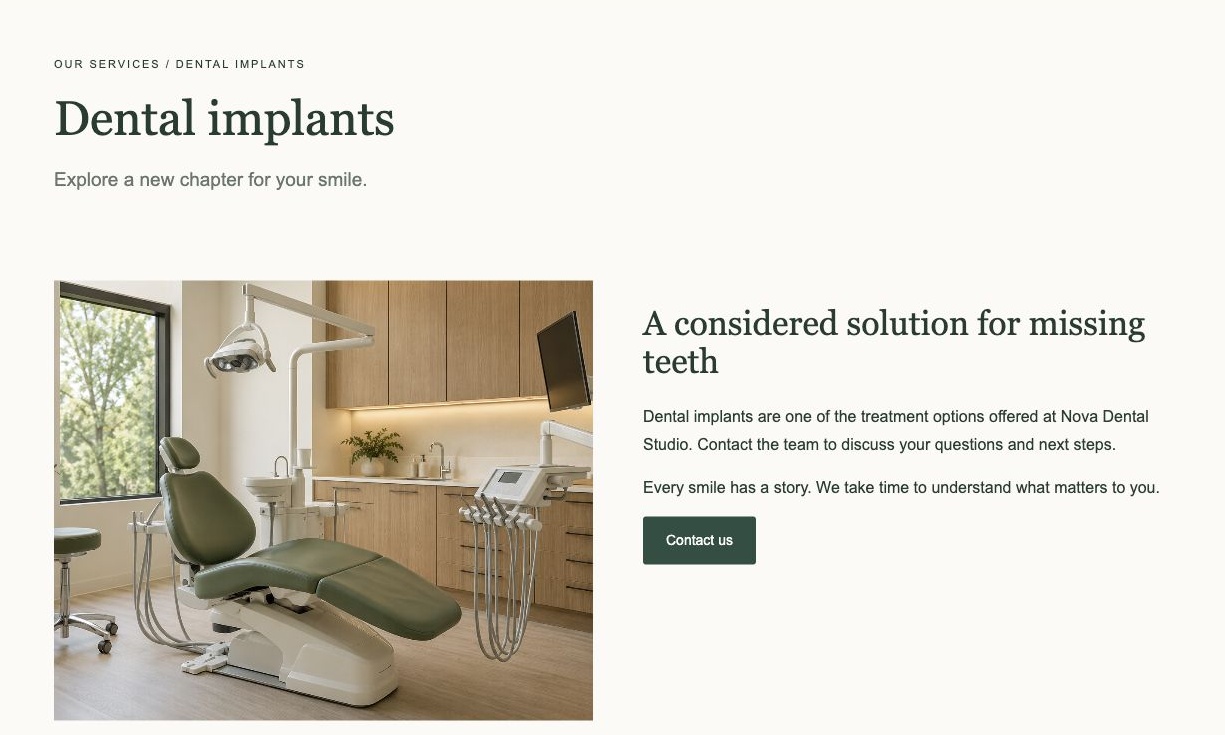
The report’s fix is modest. Keep ‘Dental implants’ as the H1, make the supporting line an H2 and leave its visual treatment alone. It also says plainly that multiple H1 elements are not, by themselves, proof of an SEO penalty. That’s the honest framing. What you gain is a readable outline, which matters just as much to someone moving through the page by headings with a screen reader.
Skipped heading levels
Jumping from H1 straight to H4 because H4 happens to have the right font size is the same mistake in another form. Heading levels describe structure; styling is a separate job. Read a page’s headings on their own. If they work as a sensible table of contents, the outline is usually fine.
Internal links that don’t say where they go
Related services that never point to each other
The roofer’s repair page and replacement page answer neighboring questions. Someone reading about repairs often wants to know when a repair stops making sense. If neither page links to the other in its body copy, the only route is back through the menu. On a small site, good internal linking is mostly editorial judgment: link where a reader would naturally ask the next question, with words that name the destination.
Vague link text
‘Learn more’ is the default label on most card grids. Nova’s services page had six cards, each ending in ‘Learn more’. The whitening and implants links opened dedicated pages; the other four went to Contact. One label, two kinds of destination. The report suggests labels such as ‘Explore teeth whitening’ and ‘Ask about hygiene’, which fix both problems at once: the link names the treatment and tells you whether it leads to information or an inquiry.
Images, URLs and the signals that override your intentions
The last group is mostly invisible on screen, so a visual review misses it.
- Missing image alt text. Informative photos need a short description of what they show. Decorative ones can carry an empty alt value on purpose. The problem is images with no decision behind them at all.
- Unclear URLs. A path like /page-482 or /services-2 tells nobody anything. Readable paths help people scanning a result, but changing live URLs creates redirect work, so this is rarely the first fix.
- Noindex or canonical signals left on by mistake. A noindex tag carried over from staging tells search engines to drop the page from results altogether. A canonical pointing at the wrong URL signals that a different page is the main version. Neither shows on the page itself, so rule them out early.
- Two pages competing for one topic. Say the roofer has ‘Roof Repair’ and ‘Emergency Roof Repairs’ pages with near-identical copy. Neither is clearly the answer. Merge them, or give each a distinct job and make that job obvious in the title, heading and copy.
Canonical findings show why judgment matters more than flags. Nova’s implants page declared a canonical with a trailing slash, while the supplied page list used the form without one. The report calls this ‘a consistency item to investigate, not proof of duplicate indexing’, asks for the live site’s responses to be checked before anyone picks a form, and says not to add redirects blindly. Without that caution, a developer can lose a day fixing something that was never broken.
Patterns beat one-offs: common on-page SEO issues are template problems
If 20 service pages share one title, you have one problem with 20 symptoms. The cause sits in the template, a CMS default or the habit of duplicating a page to make a new one. Fix 20 page heads by hand and leave the cause in place, and page 21 ships with the same fault.
A useful report groups findings by cause. Nova’s sample report has a sitewide patterns section headed ‘Fix the pattern, then check every affected page.’ One of its patterns, metadata and document clarity, ties together the missing homepage description, the copied whitening head, the second H1 and the canonical mismatch. It proposes one response (a reviewed metadata register, a logical outline and a consistent URL policy) and warns against turning the four into an unsupported ranking-loss claim.
Prooflin’s SEO area is built around the same idea. For each affected page it quotes the current title, description or heading under the label On the Page Now, and puts a Suggestion beside it with the reason it was written. Patterns across pages, such as duplicate titles, are flagged as patterns. When a suggestion depends on content the page doesn’t have yet, it’s labeled Use Only After the Content Is Added. In the Nova sample, the richer whitening description has to wait until the page actually covers results and aftercare. The on-page SEO reporting page shows the format.
For consultants, the quoting is what gets work approved. A client can say yes to a finding that shows their exact current title next to a reasoned alternative. ‘Fix your meta tags’ just goes on a list. The page for SEO consultants shows that format. If implementation is where things stall, read why SEO recommendations don’t get implemented.
What fixing these will and won’t do
Distinct titles, honest descriptions, a clean outline and descriptive links make each page easier to understand for people and for search systems. They don’t guarantee any position, and search engines may rewrite your titles and snippets anyway.
Order matters. A stray noindex keeps a page out of results entirely, so it goes first. Then shared titles and descriptions on the pages that bring in inquiries, then headings and links, then alt text. URL changes come last because of the redirect work. Deciding what a whole review should cover is a separate question, answered in what a website audit should include.
What to do this week
- Read the titles of your five most important service pages side by side, the way a searcher meets them. If any two could swap without anyone noticing, that’s your first fix.
- Ask whoever built the site where titles and descriptions come from: a field on each page, a template default or a plugin setting. The answer tells you whether this is one fix or twenty.
- Decide which page owns which topic before anyone rewrites a word. Overlapping pages need a decision first; fresh copy on top of an overlap just moves the problem.
- Get the business facts approved: services, towns served, what happens at a first visit. Descriptions written ahead of those facts get rewritten twice.
- Look through the sample Website Audit to see current text, suggestions and their conditions laid out page by page.