
Why most attempts to explain bad campaign results to a client backfire
There are a few familiar ways to handle a bad month badly, and most clients have sat through all of them.
The first is the reshuffle. The report opens with impressions, reach and click-through rate, which look fine, and the cost per lead turns up on page six. The client finds it anyway, and now the question isn’t about the campaign. It’s about what else you’ve arranged for them not to notice. If your reports lead with volume even in good months, read the difference between vanity and actionable metrics first.
The second is the fog: auction pressure, learning phases, signal loss, the algorithm. All real, none checkable by the client. Blaming the platform also invites an awkward question. If the algorithm decides the results, what are they paying you for?
The third is quieter: apologize and promise a rebound. “We’ll have it back under $40 next month” is a guess with a deadline, and it turns next month’s report into a test of your forecast.
What a client wants when a campaign underperforms is simpler. What happened, why you think so, how sure you are, and what you’re doing about it.
Lead with the result in one sentence
Put the bad number first, in plain words, with the spend and the volume beside the ratio. Take a hypothetical physio clinic spending $3,000 a month on Meta lead ads:
“June cost $75.00 per lead against $37.50 in May. Spend was the same $3,000, so we got 40 leads instead of 80.”
The owner knows the size of the problem in five seconds, and knows you aren’t hiding it. The counts are there on purpose. A ratio on its own can hide a large swing in volume, and a client who later works out that “cost per lead went up” meant “half as many patients called” will feel misled.
Prooflin’s sample client report for a fictional gym, FitForge, opens its June summary the same way. Under the heading June in plain language it gives spend, impressions, link clicks and recorded leads first, and only then the $20.00 cost per recorded lead those totals produce.
Keep the cause and the apology out of that first sentence. Opening with a cause (“Because auction costs rose...”) sounds like an excuse before the number has landed.
Separate what you know from what you suspect
Most explanations blur what the data shows with what you believe. The fix is to label every claim. Clients cope well with “we don’t know yet” when it sits beside things you clearly do know.
Split the cost per lead into its parts first. If the cost per thousand impressions doubled while click-through and leads per click held, look at the auction and the audience. If delivery cost held but people stopped clicking, look at the ad and the offer. If they clicked as often but stopped submitting, look past the click: the landing page, the form, the offer as shown there, and the tracking. Leads divided by clicks isn’t a traced path of real people, but it tells you where to dig.
Say the clinic’s CPM and click-through barely moved and leads per link click halved. That points past the click.
Causes inside the account
These are yours. Name them first and the client will trust the rest more.
- A targeting, creative, bidding or budget change that sent an ad set back into Meta’s learning phase. Several significant edits in quick succession can keep delivery unsettled for weeks.
- A strong ad paused or rejected, so spend drifted to weaker ones.
- Spend shifting toward cheaper placements that produce fewer leads.
- Creative wear, with care: an average frequency figure can’t prove fatigue. You need response falling over time, ad by ad.
Causes outside it
These are real, but they’re also the ones most often used as cover, so each needs its own evidence.
- Offer: a promotion ended, a price went up, or the page stopped showing one.
- Landing page or form: a redesign, a new required field, a broken mobile layout.
- Season: name the specific holiday or buying cycle and show it in the client’s own history. Vague “seasonality” is the algorithm excuse in a different coat.
- Capacity: stock sold out, bookings paused, the sales team stopped calling back.
- Tracking: fewer recorded leads and fewer leads aren’t the same thing. If you suspect this, read what to tell the client when conversion tracking breaks before the call.
Naming an outside cause isn’t blame if you bring the evidence. “The form got longer on June 4” is a fact the client can check in one message. “The website is the problem” sounds like you protecting yourself.
Say what the data can’t show
An honest account of a bad month includes the questions the data can’t answer. Writing them down stops you being pushed into claims you can’t support.
The obvious one is lead quality. Forty leads at $75.00 might beat eighty at $37.50 if the longer form filtered out people who’d never book. Until the clinic says how many leads became appointments, you can’t tell. Lead quality versus cost per lead covers getting that data without a fight.
The other is cause. The FitForge sample’s internal Performance Audit makes a related point about a single month of data:
One period cannot show improvement
Finding
Only June 2026 is supplied. There is no comparable prior period, planned target or approved business threshold for CPL, CTR or lead volume. The report cannot call June improved, declining or above target.
How to check it
When the next period is available, align duration, definitions, currency, campaign scope and attribution. Show spend and lead totals alongside CPL so that a ratio does not conceal a large change in volume.
Limit
A same-length month is not automatically comparable; promotions, seasonality and operating capacity may differ. A later comparison still does not by itself establish causality.
That limit bites harder in a bad month. When you set this month against last, say what else differed, and don’t let a difference stand in for a cause.
Two documents, one dataset
An honest bad month has two readers, and they need different documents.
Your team needs the candid diagnosis: which edit reset delivery, which test should have waited, how long the form change went unnoticed. It can be blunt about your mistakes, because its job is to stop them recurring.
The client needs a plain-language account of the result, the causes and their evidence, the limits and the plan. The client version may leave out detail, but it must never reach a different conclusion from the internal one. If your notes say “we muddied it with the audience change” and the client hears “market conditions”, that’s spin, and it surfaces the day someone forwards the wrong file.
Prooflin’s campaign reporting follows the same split. From one dataset you confirm metric by metric, it drafts an internal Ad Campaign Performance Audit and a client-safe Client Ad Campaign Report. The internal audit can be exported as a PDF but can’t be published as a hosted report, and sharing the client report never includes it. Getting both is the Ad Campaign Audit + Client Report option, which uses two full generations and needs the Professional plan or above.
The FitForge paired view shows both from the same June data. FitForge’s month is a baseline with missing outcome data rather than a disaster, but the two voices differ in just this way. The internal audit has a finding titled There is no supported winner to scale. The client report carries that conclusion into The decisions for the owner, which says the report does not “provide a basis to scale.” Plainer words, same verdict.
Give a plan the client can check
Plans lose clients a second time by being vague (“we’re optimizing”) or by promising a number. A checkable plan says, for each action, what changes, by when, and how you’ll both know whether it worked.
- Restore the two-field form by July 8. The developer makes the change; you confirm the lead event still fires. Check: leads per link click over the next two weeks, against May.
- Freeze audience and budget edits until July 22, so the form change can be read cleanly. Check: no edits in the change log.
- Get booking outcomes for June’s 40 leads by July 12. Check: you can say whether they were worse, the same or better.
- Review together on July 25. If leads per click are back near May’s level, the form is the likeliest explanation. If not, the offer is next on the list.
Every item names work and evidence, and none names a cost per lead you’ll hit. Promise the work, not the outcome. You control whether the form is fixed by the 8th. You don’t control a July auction.
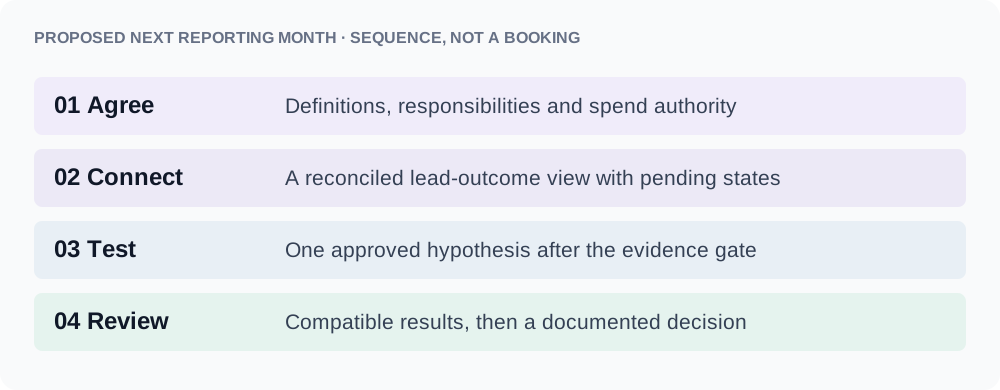
Example wording to explain bad campaign results to a client
Adapt these to your own facts, in a meeting or at the top of an email.
- The result: “June cost $75.00 per lead, double May’s $37.50. Same spend, so 40 leads instead of 80.”
- Your mistake: “We changed the audience on June 6, two days after the form change. That made the cause harder to see, and we should have waited. That’s on us.”
- An outside cause: “The booking form went from two fields to five on June 4. People clicked at May’s rate, but half as many finished. We think that’s most of it. We haven’t proved it.”
- The unknown: “We can’t tell yet whether June’s leads were worse. If the front desk shares how many booked, we’ll know by the 12th.”
- The plan: “By the 25th we’ll know whether restoring the form brought completions back. If it didn’t, we’ll tell you what we’re checking next.”
No “unfortunately”, no algorithm, no forecast. The client could repeat any of it to a business partner without misrepresenting what happened.
What to do before this week’s client call
Before you present or send anything
- Write the one-sentence result, with spend and volume beside the ratio.
- Label each cause known, suspected or unknown, with its evidence.
- Own your mistakes in the internal notes, then check the client version reaches the same conclusion.
- List what the data can’t show, starting with lead quality.
- Turn each fix into a dated action with a check, and cut any forecast.
Then choose the delivery. When you explain bad campaign results to a client, a short call followed by the written version lands better than a report arriving cold. If it has to go by email, see how to email a report so it gets opened and acted on.