Why audit walkthroughs end in ‘we’ll have a think’
Most stalled walkthroughs start with a decent audit and a meeting that follows the report’s table of contents. You work through technical, then UI/UX, then SEO, and by the time you reach the findings that matter, the client has spent half an hour on things they can’t act on. Somewhere around the third missing alt attribute, they stop asking what to fix and start asking whether the whole site is wrong.
That question is a symptom. A long list with no sequence sounds like everything is broken, and the natural response to that is a rebuild, or a long pause while they think about one. Neither is usually what the audit recommends.
The report is the record: every finding, every piece of evidence, every limit. The meeting has a narrower job, which is to get a few decisions made by the people who can make them. Judge the meeting by how many decisions leave the room with a name and a date attached.
Send the summary before the meeting
Send a short written summary one or two working days ahead, with the full report attached or linked. Most clients won’t read the whole report first. That’s fine, as long as the person who signs off on spending sees the shape of the work before reacting to it live.
Say who should attend: someone who can approve budget, someone who knows the business facts the site depends on (services, booking process, pricing rules), and whoever will do the work. If the person with the facts isn’t there, half the decisions stall on ‘I’ll check with Sam’. The covering email deserves some thought too, and emailing a report so it gets opened goes through it. Settle whose brand is on the screen before the call, not during it; white label vs co-branded reports walks through that choice.
The one written page the decision-maker reads
Assume the most senior person reads one page and nothing else. It should say what’s working and should be kept, the main weakness in plain words, the first two or three actions, and what wasn’t checked. Prooflin’s published sample for Nova Dental Studio, a made-up clinic, is a useful reference. Its summary is headed The next step should be as clear as the first impression, and it lists what to preserve (a consistent visual identity, a descriptive homepage title, dedicated treatment pages, visible phone and opening hours) before it says where to concentrate the work.
Leading with what to keep answers the rebuild question before anyone asks it. A client who has just read that the site’s foundations ‘should survive the next iteration’ is far less likely to spend the meeting wondering whether to start over.
How to present a website audit to a client: the first ten minutes
Script the opening, in this order:
- Scope. Which pages you reviewed, at which screen sizes, against what goal. For the dental sample, that’s seven pages, on desktop and at a 390px phone width, judged on one question: does the site help a visitor begin an appointment or treatment conversation?
- What you didn’t check. Rankings, traffic, real-user speed, whether the booking system actually delivers, full accessibility conformance: whatever was out of scope. Limits stated up front are forgiven. Limits discovered in month three aren’t.
- The decisions you need today. Name them, usually two to four, and promise to come back to them in the last ten minutes.
That third item does most of the work. Name the decisions only the client can make, because those are what block the work. The sample’s action plan makes them easy to find: every action lists a dependency. Moving the mobile booking button depends on a confirmed appointment destination. Labeling the contact form waits on the clinic’s decision about which fields are required. Explaining the first visit on the implants page needs the clinic’s actual consultation workflow.
The agency can’t settle any of those. Put them on the agenda and the meeting has a destination: a booking URL, a field list and a named person to describe the first visit. The findings become the reasons for those decisions instead of a list everyone sits through.
What to put on the screen
Show the P1 and P2 findings one at a time, each with its evidence open: the actual screenshot, title tag or form. When the client can see the booking button sitting below the first phone screen, nobody debates whether it’s there.
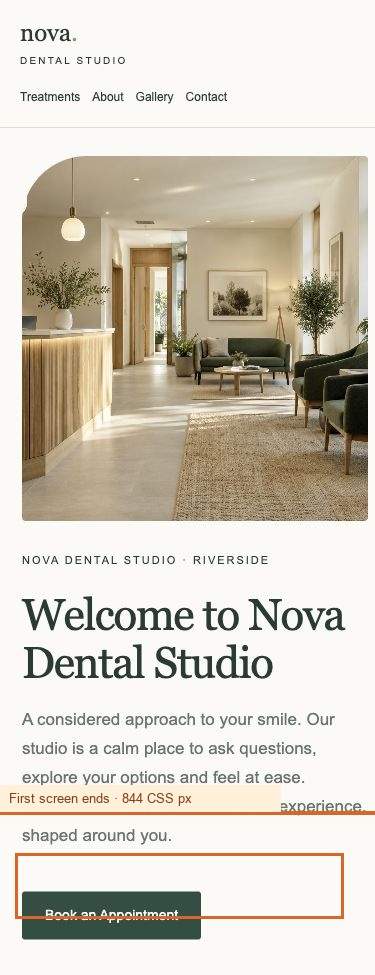
For each finding, cover four things and stop: what you observed, why it matters to this business, what you recommend, and what ‘done’ looks like. That last one gets skipped most often, and it’s the most useful in the room, because it turns a recommendation into something the client’s developer can verify.
The first mobile booking CTA sits below the first screen
Observed
At the 390 × 844 CSS-pixel viewport, the header’s desktop booking link is hidden. The first visible “Book an Appointment” link begins at approximately y=892, after the clinic image and welcome copy. It is below the first 844-pixel screen.
Completion check
At 390 × 844 and 320px wide, confirm the primary booking action is visible without scrolling, can receive keyboard focus, and opens the intended destination. Check that it does not obscure navigation or overlap the headline.
A completion check gives the client a test they can run themselves, and it shows, without you saying so, how small the fix is. A low-effort P1 with a clear done-condition is an easy yes.
If you produce reports with Prooflin, a finalized report already leads with a summary and area scores, and its priority action plan runs from P1 Immediate down: close to the order a meeting needs. On the Professional plan and above, an Owner or Admin can publish it as a hosted report: a fixed web snapshot, with an optional password, that you can share on screen during the call. Sections marked Internal only never appear in the hosted version, so team-only material stays off the client’s screen. The PDF remains the formal record.
Group findings by pattern, not by page
When several findings share a cause, present the cause once. The sample’s patterns section, headed Fix the pattern, then check every affected page, groups six findings across four pages into one incomplete route to booking. In the meeting, that becomes a single conversation (‘your booking language changes several times between the homepage and the contact form’) instead of six.
What to cut
- P3 and P4 findings, beyond saying where they sit. The sample’s plan, headed A practical sequence for the next 30 days, starts with the two P1 actions, clears the six P2s within seven days and leaves the other ten for later in the month. They need no airtime in a first meeting.
- Methodology, unless asked. Have one sentence ready.
- Area scores as a headline. Nobody can act on ‘70 out of 100’.
- Issue counts used for drama. ‘18 issues’ sounds like a broken site. ‘Two fixes this week’ sounds manageable.
- Anything you can’t show evidence for on screen.
Handle doubt honestly, in the room
Say what you don’t know
Plenty of audit presentations manufacture urgency with a hero number: estimated traffic lost, revenue left on the table. Skip it. Without the client’s analytics and a method you could defend line by line, that figure is invented, and whoever asks how you got it will discount everything else you say.
State confidence plainly instead. How sure you are that an issue exists and how sure you are about its effect are separate questions, and clients follow the difference easily once you name it. The dental sample puts it in one line: confidence in observations is stronger than confidence in outcomes. The booking link is below the fold; that’s certain. How many bookings it costs hasn’t been measured. Say both.
When the client asks ‘is this really a problem?’
Someone will, often the person who built the site. Keep the answer short: point to the evidence, restate the business reason in a sentence, and say how it could be checked. ‘The prompt in each field disappears as soon as someone starts typing; you can see it here. That makes an entry harder to check before sending. Your developer can try it on a phone this week.’
Then move on. A long defense makes a finding look shakier than it is and eats the time you need for decisions. If the disagreement is genuine, log it as an open question with an owner. Pushback that surfaces after delivery, when fixes quietly don’t happen, is a different problem; why SEO recommendations don’t get implemented deals with that.
Close with an owner and a date for each decision
Protect the last ten minutes. Go back to the decisions you named at the start and agree who owns each one, by when, and what ‘done’ means. Write them down while everyone is in the room, and read them back.
The client owns three of the four rows, and that’s typical. Most dependencies in the sample’s plan are client inputs: a confirmed appointment destination, a decision on required fields, an approved service list, the clinic’s real consultation workflow. A written log makes that visible before it turns into a silent delay that gets blamed on whoever ran the audit.
Leave a version the client can reread
Tell them where the report lives and what to read first. A hosted link is easier to reopen than a buried attachment, and because it’s a fixed snapshot, what they reread matches what you discussed. If you set a password, send it separately from the link. If the report changes, finalize a new version and publish again; each publication gets its own link and the previous one stops working, as the guide to publishing and unpublishing hosted reports explains. If someone needs a file to forward, choose Allow PDF download when you publish, and they can download the PDF from the same page.
Follow up the same day with the decision log in the body of the email, not as another attachment.
What to do before your next walkthrough
Most of how to present a website audit to a client is settled before the call starts. Five things to do this week:
Before the call
- Write down the decisions you need, and who can make each one.
- Send the one-page summary and the full report a day or two ahead.
- Pick the P1 and P2 findings you’ll show, with each piece of evidence ready to open.
- Prepare one sentence on what the audit didn’t cover.
- Book the last ten minutes for owners and dates, and keep them.
If you run these meetings for several clients a month, preparation is most of the cost; how agencies use Prooflin for client reporting shows the review-then-deliver flow. And if the walkthrough currently goes out free, how much to charge for a website audit treats the delivery meeting as part of the price.