A refined identity, ready for more dependable everyday use.
PREPARED FOR
Aster & Co Interiors Dubai · Interior design studio
REPORT DETAILS
11 October 2026 · Version 1.0 ASTER-LG-2026-01 · 3 supplied assets
Authored sample report. Original sample artwork and evidence-based editorial assessment for the supplied Aster scenario. This is a local reference report, not the result of a live Prooflin engine run.
Includes all source variants, manual inspection views, ten findings, eight recommendations and a practical usage plan.
PROOFLIN / Logo Audit
Keep the identity. Refine how it travels.
The wordmark already has a credible visual foundation: a clear serif name, a restrained service descriptor and a warm palette. The supplied architectural icon extends that language without competing with it. The most useful next step is a focused production and usage refinement, rather than a wholesale redesign.
OVERALL EDITORIAL ASSESSMENT
76 / 100
Good foundation · targeted refinement
Authored judgment for this three-file set; not a measured benchmark or calculated average. See the assessment notes.
Decision for the studio
Use the full wordmark on quiet light layouts and the supplied dark panel where a panel is intentional. Resolve small-size and background gaps before expanding icon-only use.
Three priorities
Protect the service descriptor. Verify real artwork size in headers and signatures; the transparent canvas can make the mark smaller than expected. F02 / F03
Strengthen very small icon use. Develop and test a compact treatment for 16–32px contexts. F04
Complete background coverage. Add approved transparent light exports; retain the dark-panel version for deliberate panel use. F06
Preserve these strengths
Keep the serif/sans hierarchy, synchronized light and dark wordmarks, restrained palette and architectural idea. None of the observed issues requires abandoning those elements.
No critical or high-severity issue is established by these inputs. The main risks are inconsistent application and weak small-format reproduction. Commercial recognition, legal clearance and print readiness remain unassessed.
PROOFLIN / Logo Audit
Context, purpose and review boundary
The supplied scenario describes a Dubai interior design studio serving premium homeowners, property investors, boutique hospitality owners and expat families. The desired character is elegant, calm, premium, warm and modern. This context informs qualitative fit; it is not a record of verified customer behavior.
In scope
What was examined
Three supplied PNGs
Primary wordmark, architectural arch icon and dark-background wordmark. All three contain an assessable logo subject.
Visible identity
Wording, hierarchy, spacing, shape, balance, palette, transparency and consistency within the supplied set.
Manual size and placement views
Resampled artwork, background blocks and generic header, avatar, proposal, signature and watermark layouts.
Customer guidance
Priorities, suggested designer refinements, provisional usage rules and completion checks.
What this review can support
The report can identify visible weaknesses in these exact assets and explain why they may matter in the proposed uses. It can propose a practical next check. It cannot establish how an unsupplied website, account, document or print process currently behaves.
What remains outside the evidence
No live website or social account was audited. No audience testing, competitor-similarity scan, trademark search, legal clearance, certified print proof, production vector-path audit or performance study was conducted. No approved Aster usage guide was supplied.
About the inspection views: they are manually constructed from the frozen original PNGs. They help explain observations; they are not mockups generated by a Prooflin product feature and do not show an actual client deployment.
Recommendations describe work a designer or channel owner could carry out. They are not claims that redesigned logos, new variants or a brand kit have already been delivered.
PROOFLIN / Logo Audit
A useful reading of the scores
Scores summarize the authored assessment of the visible set. They are directional judgments on a 0–100 scale, not measured results, rankings or guarantees. Small point differences should not drive decisions. The evidence and recommended next action matter more than the number.
Category
Score
Interpretation
Wordmark legibility
78
Clear at generous sizes; the descriptor is fragile in compact placements. E01 / F02.
Small-format scalability
62
The full lockup and fine-line icon both need explicit small-use decisions. E01–E02 / F02–F04.
Visual balance
84
Strong name/descriptor hierarchy; a minor lower-join detail remains in the icon. E04 / E06.
Background versatility
68
Useful light and dark-panel options, with missing transparent light variants. E03 / F06.
Fit to supplied scenario
86
The restrained serif and architectural form suit the stated warm, premium direction. This is qualitative fit, not audience evidence.
How to read the scale
80–100: strong within the reviewed scope. 60–79: useful foundation with visible refinements. 40–59: substantial limitations. Below 40: major usability concerns.
How to read confidence
High: directly visible or locally measured. Medium: interpretation or advice informed by context. Not assessed: evidence needed is absent.
Overall 76/100: an independent editorial judgment of the three-file system, not an arithmetic average of category scores. No calibrated scoring model, internal weighting or live AI result is implied.
Not scored: memorability, market distinctiveness, legal clearance, conversion impact, audience preference and certified print reproduction. Missing evidence is not treated as a zero.
PROOFLIN / Logo Audit
Three originals. One consistent starting point.
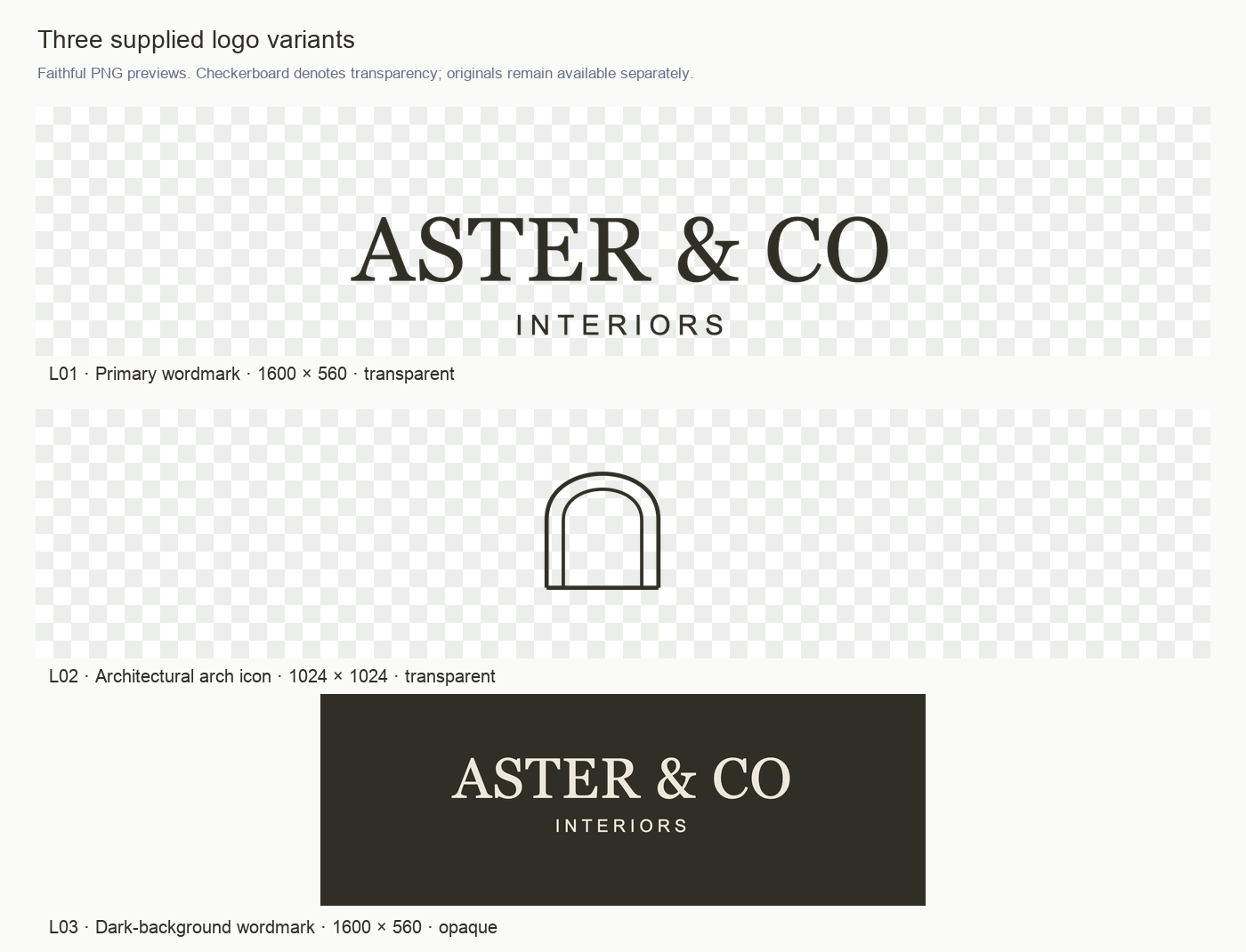
E05 · Complete supplied-set overview. Checkerboard areas represent transparency. The thumbnails are previews; the linked original PNGs preserve their full canvases. Open full-size view ↗
All three are original sample inputs created for this report and frozen before findings were authored. The icon is supplied; it is not missing. Source identifiers remain consistent throughout the report.
L01 · Original primary logo, shown on a transparency checkerboard. Open original PNG ↗
What is visible
ASTER & CO in an uppercase serif, with INTERIORS below in a smaller, widely spaced sans serif. Both lines use the same dark warm ink. The name carries the primary emphasis.
The clear vertical separation makes the two-line system easy to understand at larger sizes.
What the file contains
1600 × 560 PNG, with transparency. The visible ink bounds are 894 × 199px inside the full canvas. The extra space is file padding, not a documented clear-space standard.
Confidence: high for content, geometry and alpha behavior.
Best starting use
A quiet light website header, proposal cover or document header with room for the service descriptor. The current file needs deliberate size calculation or a placement-ready export because only about 56% of its width contains visible artwork.
Key tradeoff
The same restrained descriptor that works well at large scale becomes fragile as the entire logo shrinks. Use the size board to choose a starting size, then inspect the final placement.
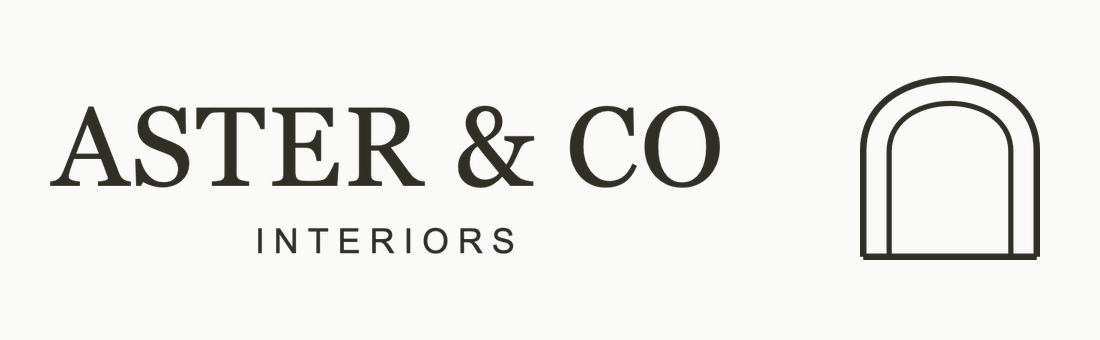
L02 · Original icon. Two nested arches sit on a shared horizontal base. Open original PNG ↗
What is visible
A near-square architectural opening drawn with fine dark lines. The outer arch is heavier than the inner arch; the base anchors both. It contains no readable studio initials or descriptor.
Its category association is plausible for interiors, but recognition is untested.
What the file contains
1024 × 1024 transparent PNG. Visible ink bounds are 556 × 567px. The source has generous padding around the drawing.
Confidence: high for geometry and size behavior; medium for the architectural interpretation.
Best starting use
An avatar or supporting brand accent where the studio name is visible nearby. The supplied icon is useful at generous sizes; very small applications require an optical refinement and a real-placement check.
What to refine
Check the thin contours at 16–32px, resolve the slight step at the lower outer corners, and approve a crop that maintains clear space without making the icon unnecessarily small.
L03 · Original warm-paper wordmark on a solid dark-ink panel. Open original PNG ↗
What is visible
The same wordmark and descriptor relationship as L01. Warm paper becomes the lettering color; dark ink becomes the surrounding panel. No extra accent or visual style is introduced.
What the file contains
1600 × 560 opaque RGB PNG. The full rectangle is part of the supplied pixels. It is not a transparent reversed logo.
Confidence: high for the matching layout and opaque background.
Best starting use
A proposal cover panel, dark section divider or self-contained branded block. It works when the rectangle itself is part of the intended design.
What to avoid
Do not assume the background will disappear over photography, a different dark color or a transparent layout. A watermark may inherit an unwanted rectangular box. A separate transparent light variant would address that specific export gap.
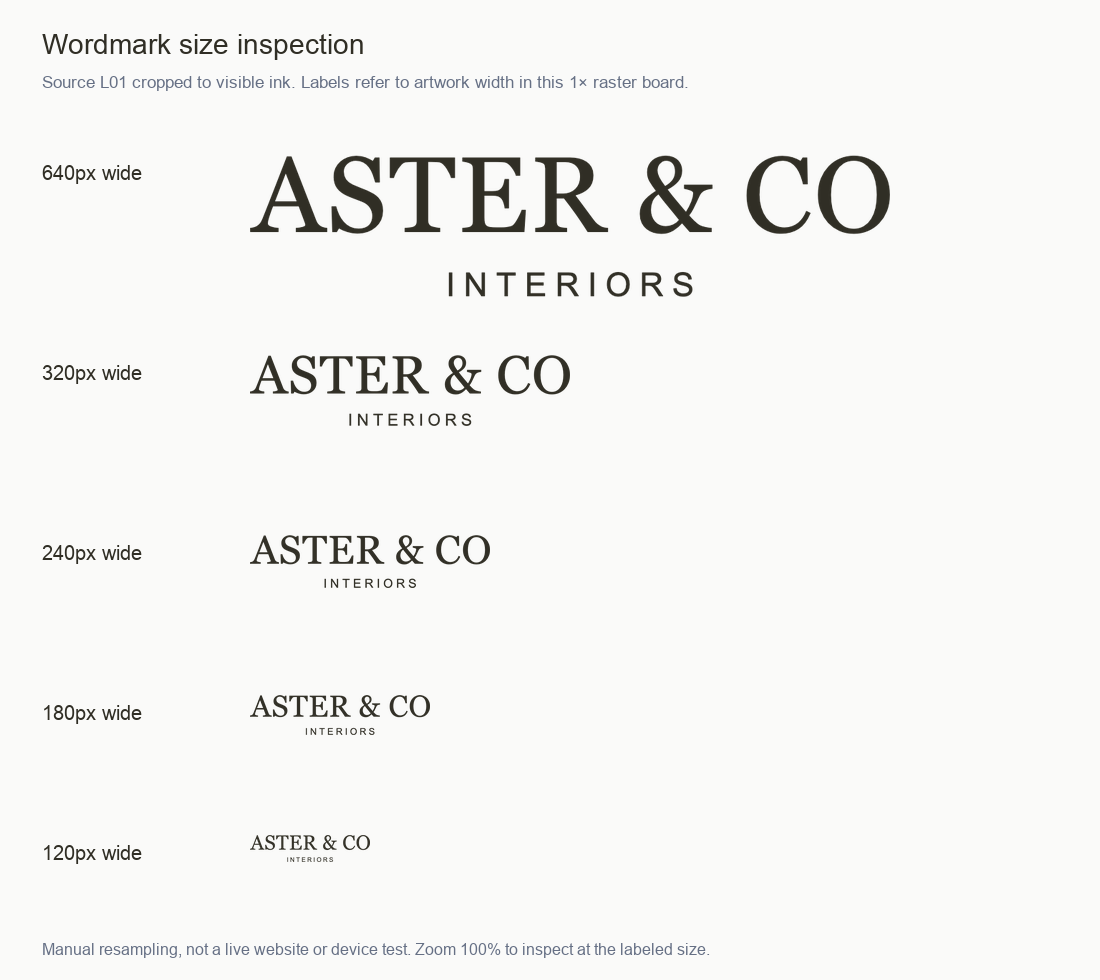
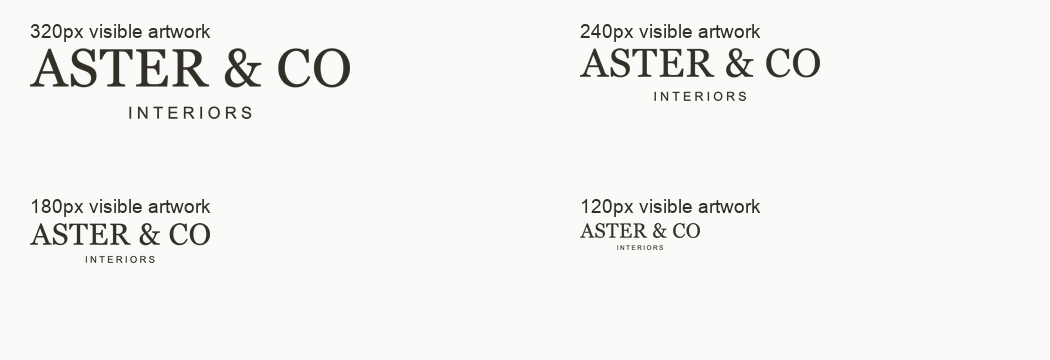
E01 · Manual resampling of the L01 ink crop. Width labels refer to the artwork inside this raster board, not its size after the board is scaled in HTML or print. Open full-size view ↗
The name holds longer than the descriptor. The 320px view has clear separation; 240px is a sensible starting point for placement testing. At 180px and 120px, the descriptor loses comfortable readability.
Inspection rule: open the full-size board at 100% to compare the labeled pixel widths. In this PDF or a narrow browser view, the whole board may be reduced; use it to compare relative behavior, not to infer an exact device threshold.
The board is one local resampling study. It does not establish a universal minimum size. See F02 and R01.
PROOFLIN / Logo Audit
Icon silhouette and fine-detail behavior
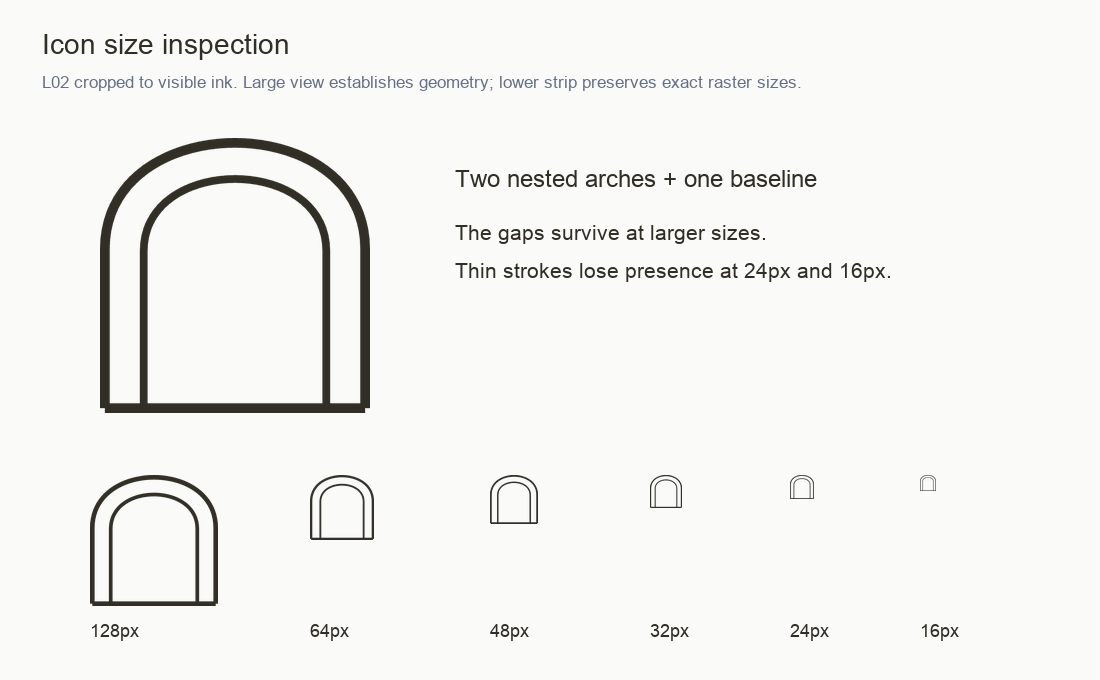
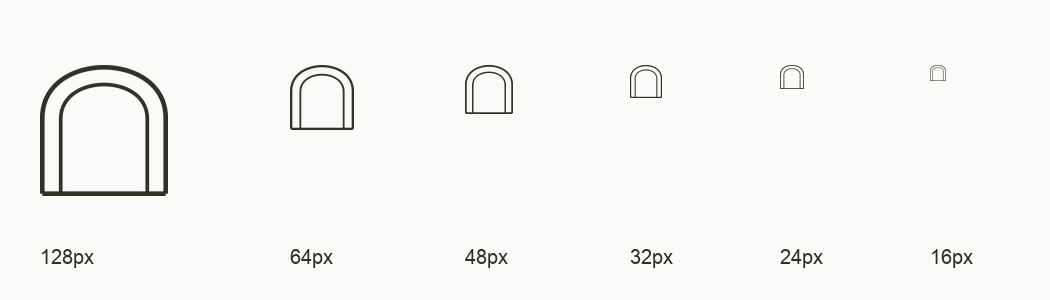
E02 · Manual size ladder from the L02 ink crop. Each small symbol is rendered at its labeled raster width inside the original board. Open full-size view ↗
Large shape, small strokes
The arched silhouette and inner opening remain clear at larger sizes. The paired contours give the icon an architectural quality. At 32px and below, stroke weight becomes the limiting factor; the form is still detectable but lacks the visual presence of the larger views.
Separate the decisions
Increasing overall placement size can help an avatar. A favicon cannot always grow, so a dedicated small-use drawing may be needed. Cropping padding and redrawing the symbol solve different problems; one should not be presented as a substitute for the other.
Related: F04 · F05 · R03. No proposed redraw appears in this board.
PROOFLIN / Logo Audit
Color and background compatibility
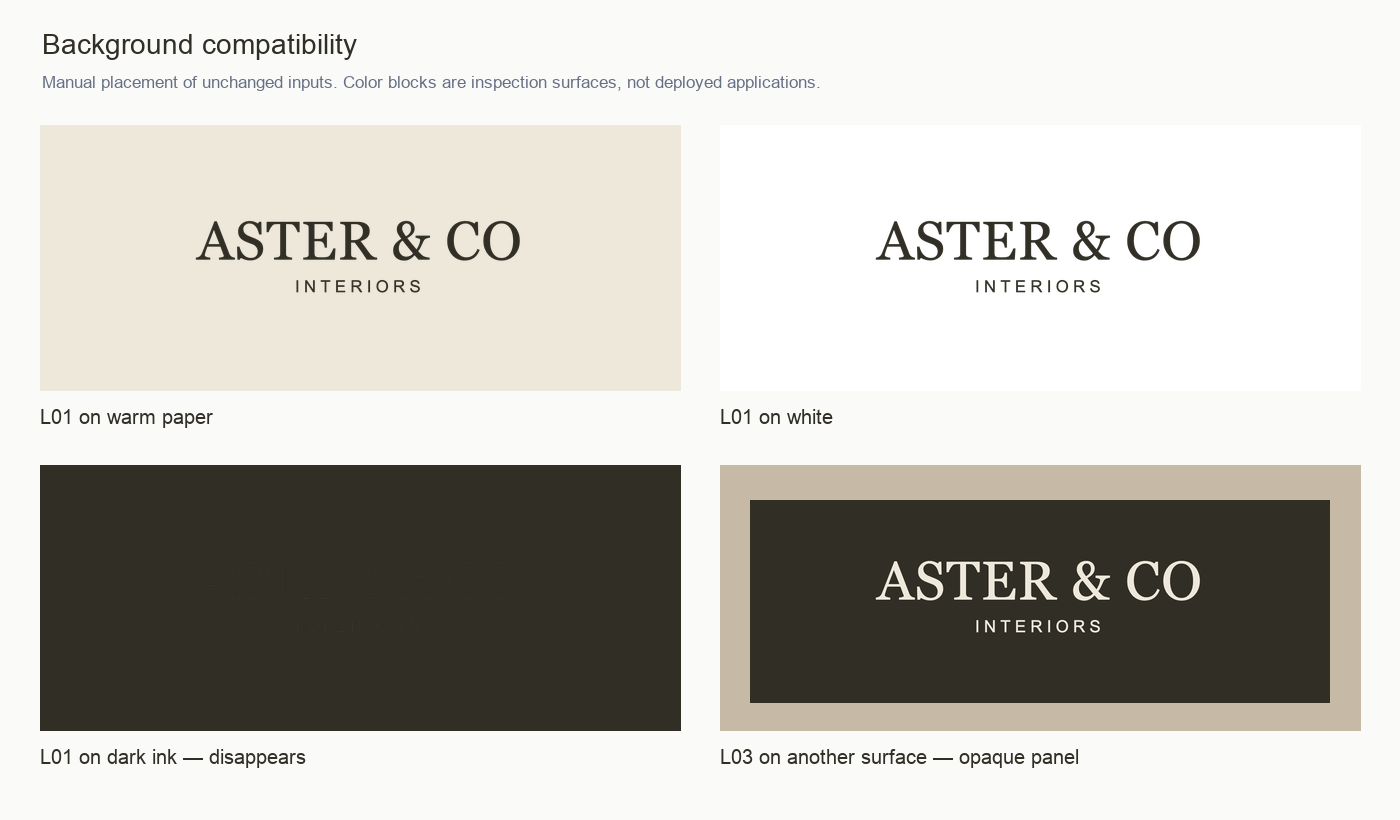
E03 · Four manual placements of unchanged original pixels. The surfaces are selected diagnostic blocks, not real client pages. Open full-size view ↗
Warm ink #302E25
Warm paper #EEE8DB
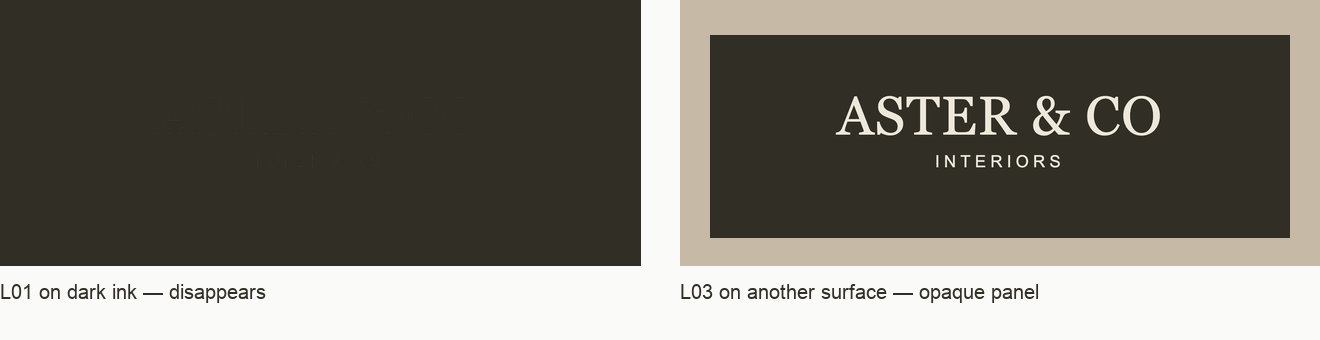
The supplied palette is restrained and the light/dark pair is visually coherent. Dark artwork on a matching dark surface becomes effectively invisible. The reverse wordmark solves that only inside its existing opaque panel.
Use background selection as an explicit placement decision. A light export will still require a suitable area on photographs; a contrast ratio alone would not settle legibility against a complex image.
Related: F06 and R05. No blanket accessibility conformance claim is made for the logotype.
PROOFLIN / Logo Audit
Consistency, spacing and optical detail
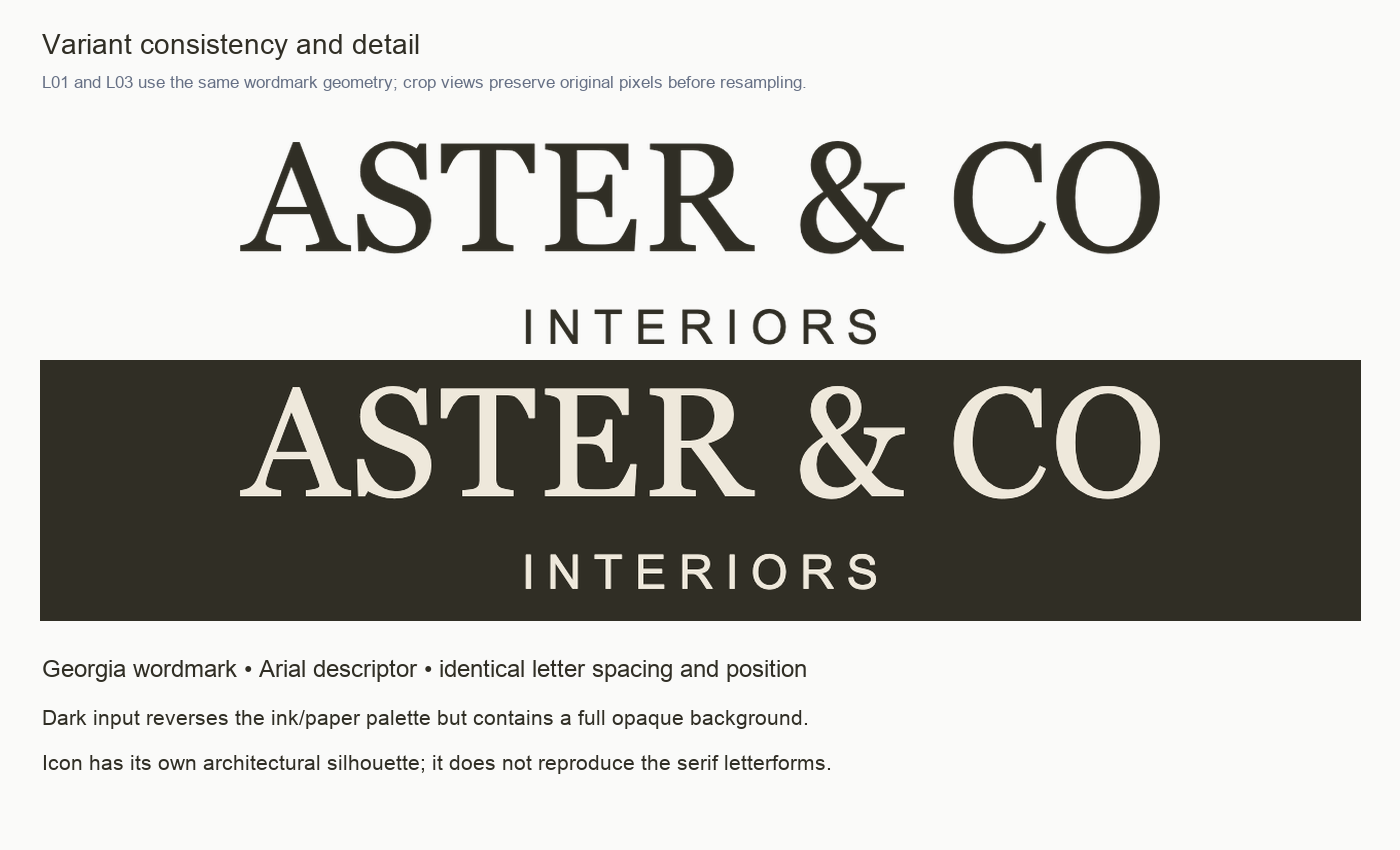
E04 · Matched visible-artwork widths show the same name/descriptor relationship in L01 and L03. Open full-size view ↗
Keep consistent
Wordmark wording, serif/sans contrast, descriptor tracking, vertical gap and warm palette. These establish the strongest continuity across the supplied assets.
Refine carefully
The icon is related by palette and architectural character, not by shared serif construction. Its lower joins and small-size strokes should be adjusted without making it feel like a separate identity.
E06 · Faithful ink crop of L02, showing the lower-corner step and the shared baseline. Cropping removes transparent margins only. Open full-size view ↗
No kerning defect is established in the wordmark at this review scale. Avoid arbitrary spacing changes merely to create a redesign. Preserve the strong hierarchy while resolving the demonstrated usage problems.
PROOFLIN / Logo Audit
How the assets behave in common placements
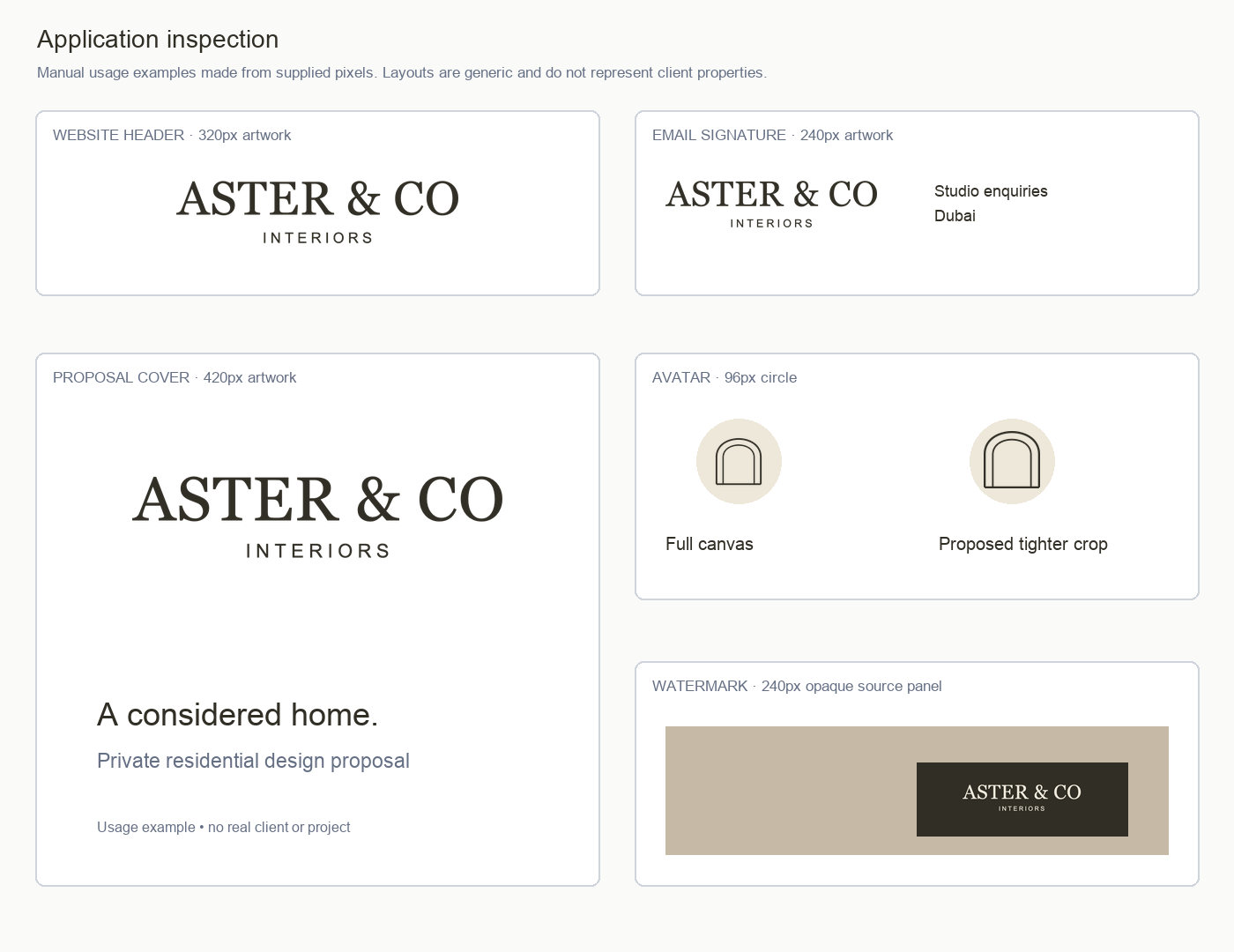
E07 · Manual examples using unchanged logo pixels: a header, signature, proposal cover, two avatar framings and an opaque-panel watermark. Open full-size view ↗
These layouts illustrate the decisions in the report. They are not actual Aster properties or client projects. The tighter avatar framing is proposed; the watermark deliberately exposes the existing opaque panel.
The header and signature use cropped inspection artwork, so their labeled widths describe visible ink. A full-canvas PNG at the same width would look substantially smaller.
Use the channel matrix for implementation checks. Real responsive headers, social masks, email clients and printed output remain to be checked.
PROOFLIN / FINDING F01
The wordmark establishes a calm, considered hierarchy
F01StrengthInformational severityP4
Source: L01 · L03 · E04 · Confidence: High for visible hierarchy; medium for scenario fit
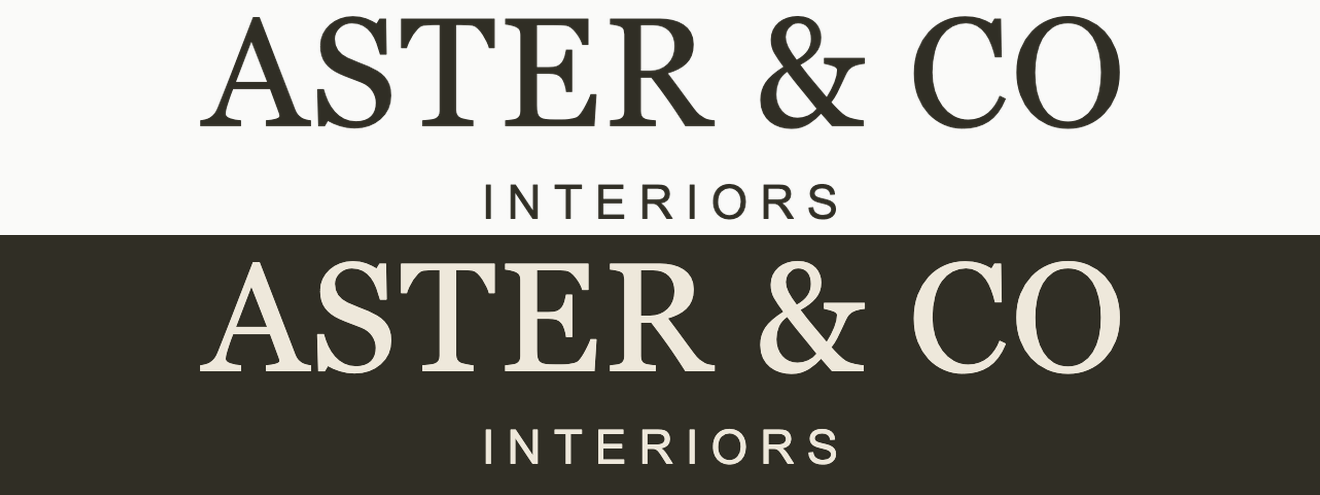
E04 · The same serif name and tracked sans-serif descriptor appear in both supplied wordmarks. Colors reverse; the hierarchy stays intact. Open full-size view ↗
What we observed
ASTER & CO is the first read. The smaller INTERIORS descriptor is centered beneath it, separated by a generous vertical interval. The rounded C and O soften the high-contrast serif forms without adding ornament. Both supplied wordmarks preserve the same geometry.
Why it matters
For a studio presenting premium residential proposals, this gives the name authority while keeping the service description secondary. It suits the supplied calm, warm positioning; it does not establish how actual customers perceive price or quality.
Recommended response
Retain the wordmark, two-line relationship and warm palette during refinement. Address the small-use and export issues before considering a broad identity change. Keep the descriptor when space permits a comfortable reading size.
Completion check
Compare every new variant beside L01 at a matched visible-artwork width. Confirm the wording, centering and hierarchy survive the change.
Limit: This is a qualitative visual assessment informed by the supplied business scenario. There is no audience research, preference test or measured premium-perception result.
The descriptor is the first element to lose legibility
F02IssueMedium severityP2
Source: L01 · L03 · E01 · Confidence: High for the inspected raster sizes
E01 · L01 at 320, 240, 180 and 120 pixels of visible artwork width. The supplied descriptor becomes increasingly fragile as the whole lockup shrinks. Open full-size view ↗
What we observed
At 320px of visible-artwork width, INTERIORS remains distinct. At 240px it is smaller but still separable in the inspection board. At 180px and especially 120px, its thin, widely spaced letters are difficult to read at normal viewing size even while ASTER & CO remains identifiable as text.
Why it matters
A small mobile header or compact email signature can retain the name yet lose the useful service cue. Enlarging a complete PNG without checking its transparent margins may still leave the actual wordmark smaller than expected.
Recommended response
Use 240px of visible artwork as a provisional lower starting point for the full two-line lockup, then check the real placement. Where that space is unavailable, have a designer prepare and approve a compact option; the supplied icon is an option only where the name is provided nearby.
Completion check
Inspect the final exported placement at 100% on the intended screen. Ask a reviewer to read the descriptor without zooming. Increase the size or use an approved alternative if it is not comfortably readable.
Limit: 240px is proposed guidance based on this manual board, not an existing brand standard or a universal minimum. Device density, display scaling, viewing distance and export settings can alter the result.
E05 · Ink-crop comparison; original canvases appear in the source overview. L01 artwork occupies 894 of 1600 horizontal pixels; L02 occupies 556 of 1024. Open full-size view ↗
What we observed
L01 has a 1600px-wide canvas, but its visible ink is only 894px wide. A 320px-wide image element therefore shows about 179px of actual wordmark. L02 has similar framing: a 96px-wide full-canvas placement shows approximately 52px of icon.
Why it matters
Teams can select apparently generous image dimensions and still produce the small-use problems seen in E01 and E02. Different people may crop the same file differently, producing inconsistent apparent sizes across channels.
Recommended response
Keep the supplied originals intact and ask for clearly named, tightly framed usage exports with intentional padding. Specify visible-artwork width separately from exported-canvas width in the usage guide.
Completion check
For each new export, measure the visible artwork and verify the intended placement rather than relying on the file width. A 240px visible L01 wordmark would require about 430px of the current full canvas.
Limit: These are local pixel-bound measurements, rounded for practical explanation. Antialiased edge pixels are included. Transparent file padding is not automatically approved clear space.
The icon needs a dedicated very-small-size treatment
F04IssueMedium severityP2
Source: L02 · E02 · Confidence: High for the inspected sizes; medium for the proposed response
E02 · At 16–24px visible width, the nested arches remain detectable but their hairline appearance has little visual presence. Open full-size view ↗
What we observed
The icon uses two fine nested arches joined by a horizontal base. Its structure is clear at 128px and 64px. At 32px the strokes are already delicate; at 24px and 16px the two contours depend strongly on antialiasing and become faint. The icon exists and is assessable; the problem is its small-size behavior.
Why it matters
A browser tab, compact app tile or dense interface may give the logo only a few pixels of stroke width. Merely exporting the same drawing at higher resolution does not change its appearance when displayed at the same CSS size.
Recommended response
Ask the designer to test an optically heavier small-use icon. Consider fewer contours or a simpler silhouette if stroke adjustment alone does not hold. Preserve the architectural idea and review the result beside the original.
Completion check
Export candidates at 16, 24, 32 and 48px and inspect them at 100%. Require visible, balanced strokes and open gaps at each approved size. Compare light and dark backgrounds separately.
Limit: The board uses one resampling method. It does not reproduce all browsers, operating systems or favicon pipelines, and no replacement icon has been designed or approved in this report.
The icon’s lower corners deserve an optical cleanup
F05IssueLow severityP3
Source: L02 · E06 · Confidence: High for the enlarged source; medium for importance in use
E06 · Tight crop of L02. The horizontal base and vertical strokes meet as separate shapes; small projecting shoulders are visible at the outer corners. Open full-size view ↗
What we observed
The outer vertical strokes extend to the baseline while the horizontal stroke stops at their centerlines. At a large inspection scale, this creates a slight step at the lower outer corners. The inner uprights also meet a heavier horizontal base, making the bottom visually denser than the arch crown.
Why it matters
The mismatch is minor at ordinary avatar sizes but becomes more apparent on large proposal covers, signage studies or enlarged presentations. A premium identity benefits from deliberate joins, especially in an otherwise very simple symbol.
Recommended response
Resolve the lower joins as one intentional contour and compare the base weight against the outer arch. Make optical adjustments at both large and small sizes; do not flatten the whole icon simply to remove the corner detail.
Completion check
Inspect the revised silhouette on a plain background at a large scale, then at 32–64px. Confirm no projecting shoulder or unintended dark knot remains at the lower joins.
Limit: This is a local contour observation, not a certified vector-path or print-production review. The report evaluates supplied PNGs; a designer should verify the editable production artwork separately.
Source: L01 · L02 · L03 · E03 · Confidence: High for supplied files and manual placements
E03 · Dark ink works on the tested light surfaces. On the matching dark surface it disappears. L03 carries its own opaque rectangle. Open full-size view ↗
What we observed
L01 and L02 are transparent dark-ink exports. L03 reverses the wordmark to warm paper but includes a solid dark background. There is no supplied transparent light wordmark or light icon. Placing L03 on another surface produces a visible rectangular panel.
Why it matters
The current set supports light layouts and a deliberate dark panel. It is less flexible for a corner watermark on imagery, a dark email theme or an icon placed directly onto a dark field. Choosing the wrong file can conceal the mark or introduce an unintended block.
Recommended response
Create approved transparent light versions of both the wordmark and icon, then test them on the intended surfaces. Until those exist, use L01/L02 on quiet light backgrounds and L03 only where its full panel is intentional.
Completion check
Verify transparency in the exported files and inspect edges on light, dark and mid-tone surfaces. Review each real photograph separately; neither a light nor dark logo is universally suitable over imagery.
Limit: No photo-overlay, email dark-mode or accessibility-conformance test was performed. Logo readability here is a practical visual observation, not a blanket WCAG verdict on logotypes.
Avatar framing makes the icon feel smaller than necessary
F07OpportunityLow severityP3
Source: L02 · E07 · Confidence: High for the manual comparison
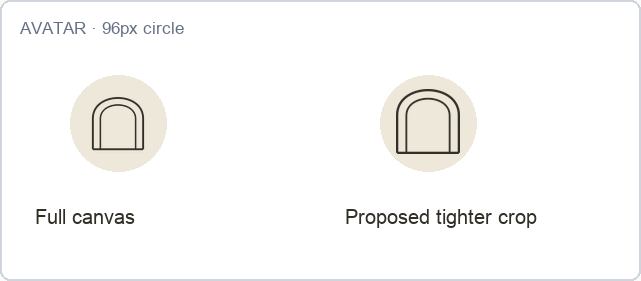
E07 · Two 96px circles compare the full-canvas source with a proposed tighter framing. The icon geometry is unchanged. Open full-size view ↗
What we observed
In the left avatar example, the full 1024px source is fitted into a 96px circle. Its generous transparent padding leaves the visible icon about 52px wide. The right example uses the same pixels cropped to the artwork and displayed at 64px, with explicit surrounding space.
Why it matters
An undersized icon can feel tentative beside other avatars. A consistent crop gives teams a repeatable starting point and helps avoid ad hoc enlargement that clips the arch or crowds the circle.
Recommended response
Prepare an avatar-specific square export with deliberate padding. Start by comparing the shown 64px artwork within a 96px circle, then validate the platform’s actual circular crop and smaller feed presentation.
Completion check
Preview the uploaded avatar at profile, feed and notification sizes. Keep the whole baseline and arch visible, with balanced space on all sides. Confirm the final crop, not only the source file.
Limit: The tighter crop is a proposed usage example, not a new supplied logo variant or an actual social-platform test. Platform compression and masking remain untested.
Source: L01 · L03 · E04 · Confidence: High for the supplied pair
E04 · Wordmark placement, lettering and descriptor relationship match across the light and dark presentations. Open full-size view ↗
What we observed
Both wordmarks use the same name, descriptor, letter spacing and layout. The warm-paper and dark-ink colors exchange roles without introducing an extra accent or changing the hierarchy. The dark panel also preserves the original canvas proportions.
Why it matters
This reduces visual drift when a proposal moves from a pale cover to a dark divider page. It provides a useful reference pair for future exports and helps the studio look coherent across documents.
Recommended response
Use this pair as the visual reference when creating new background variants. Do not independently retype or reposition the descriptor in each channel. Keep any optical correction synchronized across both wordmarks.
Completion check
Compare new light and dark versions at equal visible-artwork width. Check name spelling, baseline, descriptor offset, spacing and relative size before release.
Limit: Consistency is established only for these three supplied files and the inspected placements. It does not prove that existing websites, documents or social accounts use the same assets.
E05 · The arch suggests an architectural opening, while the wordmark supplies the studio name and service descriptor. Open full-size view ↗
What we observed
The icon is a simple nested arch rather than a readable abbreviation of ASTER & CO. Its architectural form has a plausible relationship to interiors, but the supplied pixels do not establish an exclusive association with this studio.
Why it matters
Someone encountering the icon for the first time may understand the category cue without knowing the company. Name-and-icon association is especially useful when introducing a symbol that has not been tested with an audience.
Recommended response
Use the icon near the full wordmark during initial applications, or in a context where the account name is plainly visible. Treat icon-only recognition as a question to test, not as an established property.
Completion check
Review the complete placement with a person unfamiliar with the studio: can they identify the business name from the surrounding context? If not, add the wordmark or an accessible text label.
Limit: This is not a measured memorability, distinctiveness, originality or competitor-similarity finding. No audience recall study or trademark search was conducted.
Source: L01 · L02 · L03 · E05 · Confidence: High that rules are absent from the supplied set
E05 · The supplied set contains three raster assets. It includes no approved sizing, clear-space, background or production-use guide. Open full-size view ↗
What we observed
The assets show the intended colors and arrangement but do not define minimum sizes, reserved space, avatar framing, permitted backgrounds or production tolerances. File padding alone cannot settle those decisions.
Why it matters
A team can preserve the logo drawing and still make inconsistent choices about scale or placement. A compact guide would turn the recommendations in this report into repeatable decisions for proposals, headers and social graphics.
Recommended response
Have the designer approve a one-page usage sheet covering the variants, size checks, clear space, background rules and export naming. Include explicit exceptions for tiny uses and prohibit stretching or independent retyping.
Completion check
Ask a second person to assemble a header, proposal cover and avatar using only the guide and approved exports. Resolve any choice they cannot make consistently.
Limit: No supplied guide was available for this review; a separate existing guide may exist outside the selection. The recommendations below are proposed guidance, not a claim that Aster has adopted brand standards.
Action: Begin with 240px of visible artwork for the complete wordmark on screen. Check 320px where space permits. At smaller widths, increase available space or approve a compact alternative; do not silently delete the descriptor from the supplied original.
Expected benefit: Keeps the name and service cue useful in headers and signatures.
Done when: Capture the final header and signature at normal viewing size; an unfamiliar reviewer can read INTERIORS without zooming. Record the approved visible width, canvas width and background.
Dependency: R02 framing is needed to translate visible size into an export or CSS dimension.
Limit: This starting size is provisional; it is not a universal or existing brand minimum.
R02 · Separate untouched originals from placement-ready exports
Action: Create tightly framed copies with consistent intentional padding. Name each by variant and intended use. Keep the original three PNGs as references and avoid overwriting them. Document the visible-artwork bounds for each usage export.
Expected benefit: Makes the intended scale predictable and reduces inconsistent cropping.
Done when: At the stated placement size, the visible artwork matches the guide. No antialiased edge is clipped, no proportions are stretched and original files remain recoverable.
Dependency: Complete before finalizing R01, R06 and R08.
Limit: The tight inspection crops in this report are evidence views, not approved delivery exports.
Action: Explore heavier contours and, if needed, fewer internal lines for the 16–32px range. Compare a small-use candidate with the original architectural arch. Keep the original for larger contexts where its fine drawing is effective.
Expected benefit: Improves the chance of a stable, visible mark at favicon and compact-interface sizes.
Done when: Review 16, 24, 32 and 48px files at 100% on light and dark surfaces. No important line disappears and no gap closes unintentionally. Check an actual browser tab before adopting it.
Dependency: Coordinate lower joins with R04 and reversed color with R05.
Limit: No candidate redesign or device-specific validation is included in the supplied asset set.
PROOFLIN / RECOMMENDATIONS
Then, complete the practical variants
Proposed designer and channel-owner work. These recommendations do not represent completed redesigns or delivered new logo variants.
Action: Make the lower outer corners and inner arch-to-base connections deliberate. Compare a unified outline with the current overlapping stroke construction; choose based on visible balance rather than mechanical uniformity alone.
Expected benefit: Removes a small distraction from an otherwise restrained symbol.
Done when: Large inspection shows clean outer corners. A 32–64px recheck shows no new dark knots, weak base or loss of symmetry.
Dependency: Review alongside R03 so separate size variants remain related.
Limit: The supplied PNG reveals the appearance, not a verified production-path construction.
Action: Prepare transparent light-ink wordmark and icon exports. Preserve L03 as a deliberate dark-panel option. Define when to use each variant and require a clean contrast area for photographic placement.
Expected benefit: Avoids disappearing dark marks and unintended opaque panels.
Done when: Transparency is verified; light and dark preview surfaces show clean edges. The exact final photograph or material is reviewed before use.
Dependency: Use matching geometry and synchronize any R04 corrections.
Limit: No single variant can be assumed suitable on all images or under all email dark-mode behavior.
R06 · Approve a repeatable avatar crop
P3Easy effort
Suggested owner: Brand designer + social account owner · F07
Action: Create one square avatar export with intentional padding. Use the 64px-in-96px example as a starting comparison, then inspect the real platform’s circular mask and smaller feed views.
Expected benefit: Gives the icon a more assured scale while protecting its outer shape.
Done when: No part of the arch or baseline is cut off; apparent centering is balanced. The icon remains identifiable in both profile and feed previews.
Dependency: R02 framing and R03 small-use decisions inform the final export.
Limit: A manual circle preview does not establish platform behavior.
PROOFLIN / RECOMMENDATIONS
Finally, make the system repeatable
Proposed designer and channel-owner work. These recommendations do not represent completed redesigns or delivered new logo variants.
R07 · Build association between the icon and the studio name
Action: Place the icon with or near the full name in introductory materials. On social accounts, ensure the account name provides immediate identification. Do not rely on the arch alone to communicate the studio’s name.
Expected benefit: Makes the abstract symbol easier to interpret in context without assuming audience recognition.
Done when: An unfamiliar reviewer can identify Aster & Co from the complete placement. If icon-only use is important, commission a separate recognition exercise with defined questions.
Dependency: Use R08 to describe permitted standalone contexts.
Limit: This recommendation does not predict recall or prove market distinctiveness.
R08 · Approve a concise usage sheet and release checklist
Action: Record the retained wordmark, palette, variant selection, size rules, clear space, avatar crop and export naming. Keep the descriptor relationship synchronized. Mark provisional rules as such until placement checks are complete.
Expected benefit: Protects the strong parts of the identity and gives the team a consistent way to apply refinements.
Done when: A second person can reproduce the three target placements using the guide alone. Final files, sizes and approval date are recorded; unresolved print and research questions remain explicit.
Dependency: Consolidate outcomes of R01–R07 without expanding this into a wider brand redesign.
Limit: The usage guidance in this audit is advice awaiting adoption, not an existing Aster standard.
Priority is about sequence, not alarm
P2 items address visible constraints in common intended uses and should precede a broad rollout. P3 items improve polish or make usage repeatable. P4 strengths identify what to preserve. No P1 blocker is established by the supplied selection.
Suggested release order: agree the target placements → prepare framing and size variants → inspect the final placements → approve the usage sheet. Avoid issuing several partly approved file sets at once.
PROOFLIN / Logo Audit
Channel matrix · digital use
These are proposed starting choices, not an inventory of live Aster placements. “Conditional” means that the supplied file can support the use only after the stated placement check.
Channel
Starting choice
Required decision / check
Website header
L01 · conditional
Use a quiet light area. Start at 240–320px visible-artwork width; inspect descriptor legibility in the actual responsive header. R01 / R02.
Social avatar
L02 · conditional
Approve a square export with intentional padding, then test the actual circular crop and smaller feed appearance. Keep the account name clear. R06 / R07.
Email signature
L01 · conditional
Check a 240px visible-artwork starting point in the target email clients, including dark mode and image blocking. Provide the business name in real text nearby. R01 / R05.
Browser tab / small icon
New small-use variant needed
L02 becomes faint at 16–24px in this inspection. Approve and test a dedicated candidate at target sizes before adoption. R03.
Canvas size is not artwork size
A 320px image element using the current full L01 canvas shows about 179px of wordmark. A tightly framed export or a larger image box is needed to achieve the visible sizes above. Preserve proportions and verify the rendered result.
Accessible context still matters
Use an appropriate text alternative when the image identifies the studio. Avoid repeating the name unnecessarily when nearby text already supplies it. A logo does not replace clear navigation, readable text or contrast checks for the surrounding interface.
Not tested here: actual browser headers, social uploads, email-client transformations, browser-tab rendering or assistive-technology behavior in a live implementation. The report supplies inspection evidence and recheck guidance.
PROOFLIN / Logo Audit
Channel matrix · documents and imagery
The supplied originals are sufficient to study visual placement, but they do not certify print production, real photography overlays or a finished document template.
Channel
Starting choice
Required decision / check
Proposal cover / project deck
L01 on a light field, or L03 as a deliberate panel
Keep the two-line hierarchy, reserve quiet space and inspect the exported PDF at ordinary reading size. Avoid repeatedly retyping the logo. R08.
Photo watermark
Transparent reversed variant needed for dark areas
L03 adds a rectangle. Choose a suitable light or dark transparent variant only after reviewing the exact photo. Keep the mark away from busy edges. R05.
Invoice / document header
L01 · conditional
Check that the descriptor remains readable in the final PDF and any expected printout. Use real text for contact and legal details. R01.
Business card / physical print
Unassessed production use
Request production artwork, printer specifications and a physical proof. Confirm stroke reproduction, color process and material before approval.
No universal watermark setting
A fixed opacity or corner location cannot guarantee readability across photographs. The sample watermark panel demonstrates a file property; it is not a recommended finished treatment. Approve the actual photograph, variant, scale and placement together.
Keep print decisions separate
Screen PNG dimensions do not establish a suitable print size, color conversion, finishing tolerance or minimum line weight. Those depend on production files and the chosen printer or material. Do not use this report as a print-ready certification.
For the overall sequence and ownership, use R01–R08.
PROOFLIN / Logo Audit
Proposed guidance for the designer
Use the supplied wordmark and palette as the continuity reference. The purpose of refinement is to make the existing identity easier to apply consistently. The rules below are proposals to test and approve, not existing Aster standards.
1 · Preserve the name/descriptor relationship
Keep ASTER & CO dominant and INTERIORS secondary. Synchronize any optical correction across light and dark wordmarks. Do not independently stretch, retype or adjust descriptor tracking in each application.
2 · Define clear space from the visible artwork
As a starting study, reserve at least one descriptor-capital height around the full wordmark’s visible bounds, then compare it in the target layout. For the icon, start with a margin equal to the gap between its outer and inner uprights. Increase either margin when nearby text or imagery competes. These units are proposed; they require an optical check and approval.
3 · Separate large-use and small-use needs
Retain the fine-line icon where it reads clearly. Develop a dedicated small-use treatment if the required size cannot hold the contours. Name the variants so an implementer does not have to guess which drawing to use.
4 · Make background selection explicit
Provide transparent dark and light versions, plus the intentional dark-panel version if useful. Show allowed and unsuitable examples. Do not describe the existing L03 as transparent or assume a dark-colored page matches its panel.
5 · Deliver usage exports with a clear approval record
Keep master artwork, original references and placement exports organized separately. Record the approved filename, intended use, visible size, padding, color variant and approval date. Have the studio decision maker sign off on appearance; have each channel owner verify final placement.
Designer handoff: resolve R01–R06, preserve F01/F08, then consolidate R07/R08. Deliver only the agreed refinements; this audit does not call for a new brand strategy, a logo generator or an unrelated redesign.
PROOFLIN / Logo Audit
Completion and recheck checklist
Use this checklist after refinement. The audit is complete as an assessment; the proposed design changes remain work for the studio and its designer.
Originals retained. The three source files remain available for comparison and have not been silently overwritten.
Legibility checked. Name and descriptor can be read at the final header and signature sizes without zooming. Record actual visible width.
Framing approved. Usage exports contain intentional padding and produce the expected artwork size. No stretched or clipped edges.
Small icon tested. Approved 16, 24, 32 and 48px candidates hold their intended strokes and gaps on target backgrounds.
Joins resolved. Lower corners and base connections are deliberate at both large and small inspection scales.
Background set complete. Transparent light and dark exports are verified; opaque-panel files are labeled accurately.
Avatar checked in context. Actual platform crop, feed view and account-name association are reviewed.
Document output inspected. The final exported proposal and invoice are checked at normal reading size; print use awaits its own proof.
Usage sheet approved. A second person can reproduce the target placements without guessing. Provisional rules are marked or resolved.
Open questions retained. Recognition, legal clearance, print production and performance are not marked complete without their own evidence.
Reopen the relevant finding if: the final crop changes, a new background is introduced, the mark is used below its approved size, a printer changes the process or a revised export changes geometry. Recheck the affected application before expanding use.
Open the source gallery for the three full-resolution originals and their properties. All report images link to their full-size files. PDF viewer support for relative file links varies; the standalone HTML gallery is the dependable alternative.
Manual inspection crops and boards do not replace the original inputs. Crops remove transparent margins; size studies use resampling. No evidence view redraws the logo or substitutes a recommended revision.
PROOFLIN / Logo Audit
Method, limits and next actions
How this assessment was prepared
The three original PNG inputs were frozen before findings were authored. The review examined their visible content, dimensions, transparency and artwork bounds, then compared faithful crops at selected raster sizes and on selected backgrounds. Manual generic layouts supported the usage recommendations. Every finding points to a supplied source and an inspection reference.
How to use the judgment
The scores and scenario fit are authored assessments. High confidence describes clear evidence within the selected assets; it does not make a qualitative claim a measured fact. A limitation narrows the conclusion rather than invalidating all useful observations.
What this report does not establish
No live Prooflin engine run, deployed application acceptance, audience research, market comparison, legal clearance, print certification or performance result is represented. Business context comes from the supplied sample scenario. No real client project, property or portfolio work is asserted by the generic layouts.
Material limits to keep with the report
Only three PNGs were supplied for the review. No official usage guide, production vector artwork, actual responsive header, email-client matrix, social upload or physical print proof was assessed. Resampling and display conditions influence small-size appearance. Numeric guidance is proposed and requires a placement check.
Recommended next decision: approve a focused refinement brief covering size behavior, framing, small-use icon geometry and background variants. Preserve the existing wordmark and palette. Adopt final usage rules only after reviewing the completed exports in their intended placements.
Expected outcome: a more dependable logo system whose strongest features stay intact, with clear instructions for when and how each approved variant should be used.
Prooflin · Aster & Co Interiors Logo Audit ASTER-LG-2026-01 · Version 1.0 · 11 October 2026 End of report